July 3, 2026
CRM and Telephony in One System: What Business Owners Actually Gain
A CRM and telephony integration links every phone call directly to a customer record in your CRM. The call gets logged automatically, the recording attaches to the deal, and the lead gets tracked – no manager input required. For business owners, that single change replaces guesswork with a clear, ongoing audit trail of how the sales team actually handles every call.
Ask yourself a simple question: how many calls did your sales team make yesterday? Now a harder one: how many of those calls actually moved a deal forward? If you can't answer without calling a manager and asking, you don't have a sales process. You have a phone that happens to sit on someone's desk.
Why a Phone System Alone Doesn't Give You Control
A phone system handles calls. It doesn't handle accountability. Your CRM holds the client history, the deal stage, the next steps. Your phone system handles the dialing, the ringing, the conversation. The problem starts the moment these two systems stop talking to each other.
A manager picks up the phone, talks to a lead, and then has to manually decide what to do next. Log the call? Update the deal? Write a note about what was discussed? Each of these steps depends entirely on the manager remembering to do it, and doing it accurately.
In practice, that link breaks constantly. A manager forgets to log a call after a busy morning. A follow-up promise gets made on the phone and never makes it into the system. A new lead calls in, doesn't get added as a contact, and the number just disappears into a call log nobody reviews.
The result for you as the owner: gaps you can't see. You know the team is making calls. You don't know which calls turned into real conversations, which leads got dropped, or why a deal that looked promising went cold. Getting that picture used to mean pulling call logs from one system and deal records from another, then manually matching timestamps – a task closer to forensic accounting than sales management.
What Changes When CRM and Telephony Are Actually Synced
Connecting telephony to your CRM removes the manual step entirely. The system, not the manager, becomes responsible for capturing what happened.
Every Call Is Recorded Without Asking Anyone
Once telephony is integrated, every inbound and outbound call is logged automatically and attached to the right customer card. The recording itself gets saved alongside it. Nobody has to remember to do this, because nobody is doing it manually – the system captures the call the moment it happens.
This matters more than it sounds. A logged call with no recording tells you a conversation took place. A logged call with a recording tells you what was actually said, what was promised, and how the manager handled the objection. That difference is the gap between trusting a summary and verifying the facts.
Every Lead Gets a Card, Not a Forgotten Number
When a new number calls in, an integrated system creates a lead automatically – before a manager even decides whether the call is worth following up. This closes one of the most common leaks in a sales process: inbound interest that never makes it past the call log because nobody manually entered it as a contact. A leak like this can quietly cost a business a meaningful share of its inbound demand, simply because no system was forcing those calls to become trackable records.
Every Manager Becomes Accountable by Default
This is where sales team accountability stops being a management style and becomes a property of the system itself. A manager doesn't need to be reminded to log calls, because the call is already logged. A manager can't quietly skip a follow-up, because the missed call shows up on a dashboard, not buried in a personal notebook.
The Management Effect: Transparency You Used to Need an Audit For
Before integration, checking how a manager handles calls meant pulling them aside, listening to their account of a conversation, or – in the more serious cases – commissioning an actual call audit. That process took time, relied on memory, and arrived too late to fix anything in real time.
After integration, that same transparency is just... there. Every call sits on the deal it belongs to. Every recording is one click away. You don't schedule a review to find out what happened with a difficult client – you open the deal and listen.
This changes what "checking in on the sales team" actually means. It stops being a special event that signals distrust and becomes a normal part of running the business – the same way you'd glance at a sales report or a bank balance. A manager who knows every call is logged behaves differently than one who knows their calls live in a separate, unreviewed system. Not because they're being watched, but because the gap between doing the job well and looking like you did it disappears.
The owners who feel this shift most are the ones who used to find out about a lost deal weeks later, from the client, instead of from their own system.
CRM Call Tracking for Managers: What You Should See on One Screen
Call data is only useful if someone can act on it quickly. A dashboard that requires three clicks and a spreadsheet export defeats the purpose. For day-to-day management, a handful of metrics tell you almost everything you need:
-
Response time to new leads – how long between a lead coming in and the first call going out. This single number predicts conversion better than almost anything else; research from InsideSales found that responding within the first five minutes increases conversion odds ninefold compared to slower follow-up.
-
Calls per manager, with duration – not to police busywork, but to spot the manager who's making ten short calls a day versus the one making three long, productive ones.
-
Call-to-deal conversion rate – which calls actually move a deal forward, broken down by manager.
-
Missed or unreturned call rate – the number that exposes leads falling through the cracks before they turn into lost revenue.
None of this requires a separate reporting tool. Once telephony is synced to the CRM, these numbers populate automatically – the dashboard becomes a live view of the sales floor, not a weekly report someone has to assemble by hand.
Zoho CRM Phone Integration vs Odoo Phone System Integration: What's the Real Difference
Both platforms support telephony integration well, but they solve different problems. The choice usually comes down to how your business actually operates, not which system has more features on paper.
Zoho CRM is built for businesses juggling multiple channels at once – calls, web forms, chat, social media – and wanting all of it to land in a single client timeline. When a call comes in, the contact card pops up before the manager even answers, complete with deal history. For a team fielding hundreds of inbound contacts a day, that single detail saves real time and prevents the "who is this again?" moment that kills trust on a first call.
Odoo takes a different approach. It's a modular system, and that flexibility extends to telephony: calls can trigger automated next steps directly: finish a call, and the system can automatically create a task to send a proposal, no manual handoff required. For businesses that already run other operations on Odoo (inventory, accounting, project management), keeping telephony in the same ecosystem avoids the friction of stitching together separate tools.
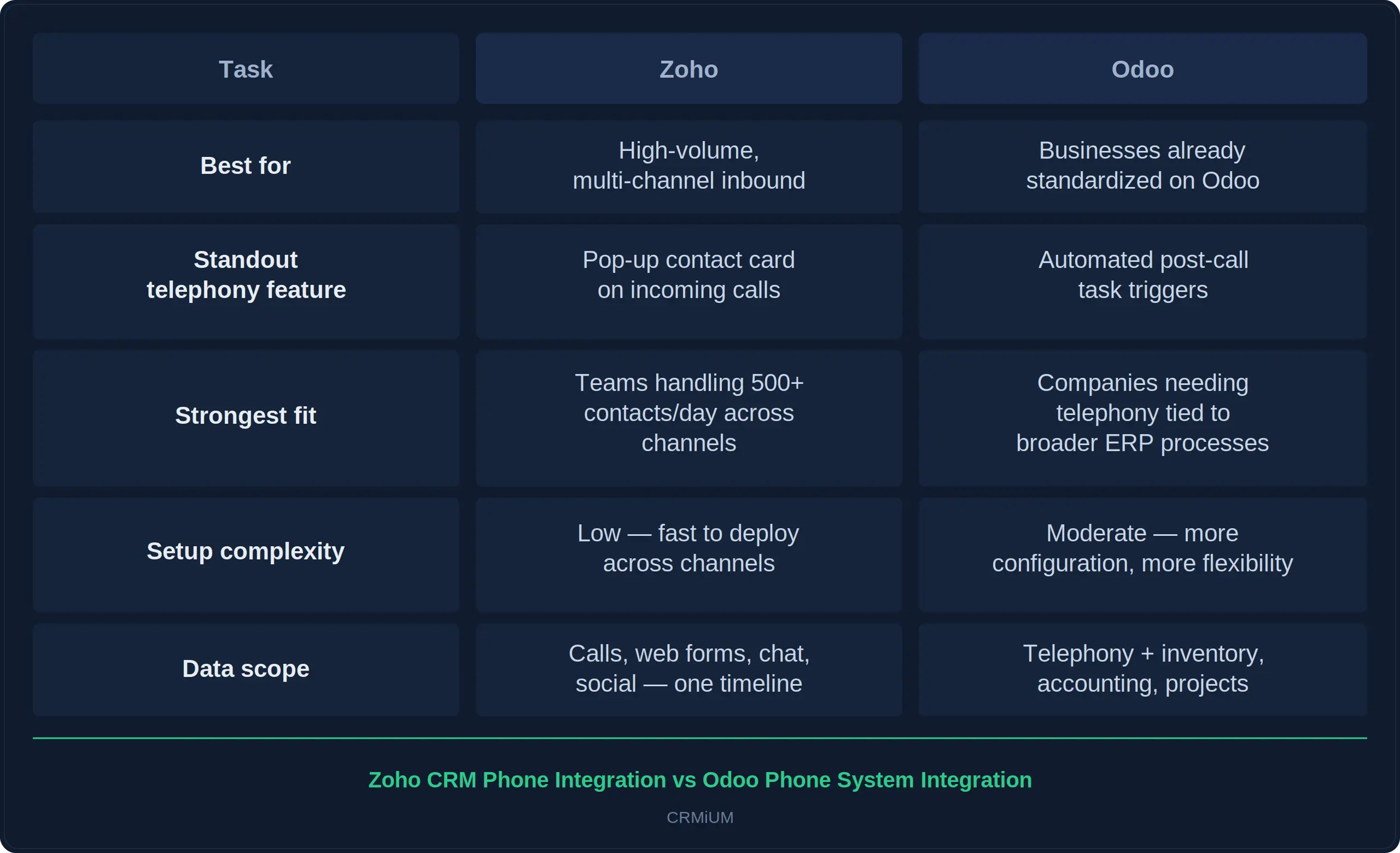
Neither system is "better" in the abstract. A company drowning in inbound leads from five different channels gains more from Zoho's unified timeline. A company running its entire operation on Odoo gains more from keeping telephony inside that same structure rather than adding a disconnected tool.
What Needs to Be Configured for Integration to Actually Work
Connecting a phone system to a CRM is a technical task that takes a developer a few hours. Making that connection actually changes how your sales team works takes deliberate setup, and this is the step most businesses skip.
A live phone-to-CRM connection with no configuration behind it just moves the same problem somewhere else. Calls get logged, technically, but nobody decided what should happen after a call ends, who should see what, or which numbers count as a new lead versus a wrong number. The integration works. The management effect doesn't show up.
Here's what actually needs to be defined before integration delivers real visibility:
-
Call logging rules. Decide what counts as a logged call versus noise – should a 4-second hang-up create a record? Without this rule, your call history fills with junk that buries the calls that matter.
-
Automatic lead creation for unknown numbers. Every new number calling in should generate a lead card by default, not wait for a manager to decide it's worth tracking.
-
The pop-up client card on incoming calls. This needs to pull the right fields: name, deal stage, last interaction, not just a phone number. A blank card defeats the purpose.
-
Recording-to-deal attachment. Recordings should land automatically on the specific deal or contact, not in a separate call log a manager has to search through by date and time.
-
KPI dashboards built for the owner, not the developer. Response time, calls per manager, conversion rate – these need to be visible on one screen, not buried in a report nobody opens.
None of these are default settings out of the box. Each one is a decision about how your sales process should actually run, translated into system logic. This is typically where a structured CRM implementation process earns its cost – turning a technical connection into a tool you actually use to run the business, not just a feature you turned on once and forgot about.
A Real Case: From 40% Lost Calls to Full Visibility
This case comes from our partners at CRMiUM, who handled the CRM integration services for this project.
A company supplying industrial equipment had a problem that's easy to recognize and hard to fix without the right setup: 40% of inbound calls were going nowhere. Managers were too busy to log every call manually, and follow-ups on those uncaptured contacts simply never happened.
After connecting Zoho CRM to its telephony system, three things started happening automatically. Every call was logged the moment it ended. Every new number triggered a lead card. Every recording attached itself to the right client file, visible to the sales manager without any extra step.
The result showed up within two months: call-to-deal conversion rose by 29%, and the number of forgotten leads dropped by nearly half. No new hires, no extra ad spend – just a process that stopped depending on someone remembering to write things down.
Final thought
A phone system tells you that calls happened. A CRM tells you who your customers are. Neither one, on its own, tells you whether your sales team is actually doing its job well.
Connecting them closes that gap by removing the dependency on someone remembering to write things down. Every call becomes visible the moment it ends. Every lead gets tracked the moment it calls in. Every manager works inside a system where the question "did this get followed up?" already has an answer.
That's not a technical upgrade. It's the difference between running a sales team and hoping it runs itself.
Follow Us in social networks


The latest from Teliqon
Stay ahead with insights from the leader in trusted communications. Subscribe for the latest blogs, updates, and exclusive content.