



Arthur Kyselevskyi
September 3, 2026
HubSpot Phone Integration: Everything You Need to Know in 2026
Manage every customer conversation from one workspace with automatic call logging, click-to-call, caller identification, contact synchronization, workflow automation, and cloud PBX capabilities.
HubSpot helps businesses keep customer relationships organized, but communication often happens in a separate phone system. Sales teams switch between the CRM and telephony platform, support agents add call details manually, and managers end up with incomplete reporting because important phone activity never reaches the CRM.
HubSpot phone integration connects your cloud PBX or VoIP platform with HubSpot CRM, bringing calls and customer data into the same workflow. Instead of keeping phone calls as separate activities, each conversation becomes part of the customer's communication history.
When a customer calls, employees can identify the caller, open the customer record, review previous interactions, and check relevant deals or support tickets before continuing the conversation. After the call, call activity can be logged automatically, while recordings and notes can be linked to the customer record. HubSpot workflows can then use this information to create follow-up tasks and support the next step in the process.
This gives sales, customer support, customer success, and account management teams access to the same customer context. Employees spend less time switching between applications or entering information manually, while managers get a clearer view of both customer communication and team activity.
Whether your business handles dozens of calls each week or thousands every day, connecting HubSpot with a cloud PBX can reduce routine administrative work, keep CRM data more complete, and make customer communication easier to manage as the business grows.
What Is HubSpot Phone Integration?
Quick Answer
HubSpot phone integration is the process of connecting a business phone system—such as a cloud PBX, VoIP platform, or unified communications solution—with HubSpot CRM. The integration allows users to make and receive business calls, automatically log phone activities, identify callers, synchronize contacts, record conversations, and automate follow-up workflows without leaving HubSpot.
Instead of using separate applications for telephony and customer relationship management, employees work from a single interface where every inbound and outbound call becomes part of the customer's communication timeline.
A modern HubSpot phone integration typically includes:
-
Click-to-call from contacts, companies, deals, and tickets.
-
Automatic logging of inbound, outbound, and missed calls.
-
Real-time caller identification and screen pop-ups.
-
Two-way contact synchronization.
-
Automatic call recording and note synchronization.
-
Workflow automation triggered by phone events.
-
Browser-based and mobile business calling.
-
Intelligent call routing through a cloud PBX.
-
Reporting and call analytics.
These capabilities eliminate repetitive administrative work while giving every department immediate access to accurate customer information.
Unlike standalone calling applications, a HubSpot phone integration transforms the CRM into a centralized communications platform where customer conversations, sales activities, and support interactions remain connected throughout the entire customer lifecycle.
Why Businesses Integrate Their Phone System with HubSpot
Most businesses already use HubSpot to manage customer relationships, sales opportunities, and support interactions. But phone calls often remain in a separate business phone system. Employees have to switch between applications, update CRM records manually, and document conversations after each call.
This creates extra work and leaves gaps in customer data. A manager may see a deal or support ticket in HubSpot but still need to open another system to understand what happened during the latest phone conversation.
Integrating a cloud PBX with HubSpot brings these two parts of the workflow together. Calls become part of the customer's communication history in HubSpot, giving employees access to call activity and customer information from one centralized workspace.
Instead of managing calls and CRM data separately, teams can spend less time on manual updates and maintain a more complete view of every customer interaction.
Why Businesses Choose to Integrate HubSpot with Their Phone System
Organizations typically integrate HubSpot with a cloud PBX to achieve several business objectives:
-
Eliminate manual call logging and CRM updates.
-
Give employees instant access to customer information before answering a call.
-
Improve collaboration between sales, support, and customer success teams.
-
Build a complete communication timeline for every customer.
-
Automate repetitive post-call activities.
-
Increase sales productivity through click-to-call and workflow automation.
-
Improve reporting with automatically synchronized communication data.
-
Create a scalable communication infrastructure for business growth.
Rather than replacing HubSpot, the phone integration extends its capabilities by making voice communication an integral part of the CRM.
The Challenges of Separate Phone and CRM Systems
When HubSpot and the phone system operate independently, the same problems appear in companies of almost any size.
A sales representative may need to search for a customer record while the phone is already ringing. After the call, employees have to add notes and call details to HubSpot manually. If they forget, part of the customer history is simply missing. For managers, this means reports may not show the full picture of customer communication.
Common challenges include:
-
Switching between multiple applications throughout the day.
-
Manually entering call details into HubSpot.
-
Incomplete or inconsistent customer records.
-
Duplicate contacts created by different employees.
-
Missed follow-up activities.
-
Limited visibility into previous customer conversations.
-
Inaccurate reporting caused by missing communication data.
-
Longer response times for inbound calls.
As call volumes grow, these small manual tasks add up. Employees spend more time maintaining records, managers work with incomplete data, and customers may have to repeat information that was already discussed during a previous call.
Connecting telephony with HubSpot helps remove these gaps by making phone activity part of the same customer workflow.
What Changes After Integration?
Connecting HubSpot with a cloud PBX fundamentally changes how customer communication is managed.
Instead of manually documenting every conversation, employees work within a unified environment where customer information, phone activity, and business workflows remain synchronized automatically.
During an inbound call, the customer's HubSpot record appears before the conversation begins. Employees immediately see previous interactions, open deals, support tickets, and internal notes, allowing them to continue the conversation with full context.
When the call ends, the integration automatically records:
-
Call direction.
-
Date and time.
-
Duration.
-
Assigned employee.
-
Call outcome.
-
Notes.
-
Recording reference.
-
Customer timeline activity.
HubSpot workflows can then automatically create follow-up tasks, update deal stages, assign activities, notify team members, or initiate additional business processes without requiring manual intervention.
Business Outcomes
Although the technical features of a HubSpot phone integration are important, organizations typically measure success through business outcomes rather than individual capabilities.
A modern cloud PBX integration helps businesses:
-
Reduce administrative work by automating routine CRM updates.
-
Increase sales productivity by enabling faster customer engagement.
-
Improve customer experience through immediate access to communication history.
-
Strengthen collaboration across departments using a shared customer timeline.
-
Improve reporting accuracy with automatically synchronized call data.
-
Support remote and hybrid teams with browser-based and mobile business calling.
-
Scale communication processes without increasing operational complexity.
These improvements enable organizations to spend less time managing communication systems and more time building customer relationships.
HubSpot Becomes More Than a CRM
Without phone integration, HubSpot primarily stores customer information.
With a cloud PBX integration, HubSpot becomes the central communication hub for the entire organization. Sales, customer support, customer success, and account management teams all work from the same real-time customer data, while phone calls, recordings, notes, and follow-up activities are synchronized automatically.
This unified approach allows businesses to create consistent customer experiences, improve operational efficiency, and support long-term growth without introducing additional communication complexity.
Common Problems Without Phone Integration
Many organizations invest in a CRM like HubSpot to centralize customer information, improve sales performance, and streamline support operations. However, if the business phone system remains disconnected from the CRM, employees continue to perform many communication tasks manually.
As call volumes increase, these manual processes become more than just an inconvenience—they slow down response times, reduce CRM accuracy, and make it difficult for teams to deliver a consistent customer experience.
The following are the most common challenges businesses face when their phone system is not integrated with HubSpot.
Manual Call Logging
Without phone integration, employees are responsible for recording every customer conversation manually.
After each call they typically need to:
-
Open the customer record.
-
Create a new activity.
-
Enter call duration.
-
Write notes.
-
Record the outcome.
-
Schedule follow-up actions.
While each update may take only a minute or two, the cumulative administrative workload becomes significant for teams handling dozens or hundreds of calls every day.
Business impact
-
Reduced employee productivity.
-
Incomplete CRM records.
-
Forgotten customer interactions.
-
Less time available for sales and customer support.
How Integration Solves It
A HubSpot phone integration automatically logs inbound, outbound, and missed calls, ensuring that customer timelines remain complete without requiring manual updates.
Employees Don't Know Who Is Calling
When incoming calls arrive without CRM integration, employees often answer with little or no context.
They may need to ask customers for basic information, search the CRM while the conversation is already in progress, or transfer the caller to another department simply because relevant information is not immediately available.
Business impact
-
Longer call handling times.
-
Less personalized customer experience.
-
Slower issue resolution.
-
Increased customer frustration.
How Integration Solves It
Caller identification automatically matches incoming phone numbers with HubSpot contacts and displays the appropriate customer record before the call is answered.
Employees begin every conversation with complete customer context.
Customer Information Is Scattered Across Multiple Systems
Many organizations store customer information in HubSpot while maintaining communication history inside a separate phone system.
As a result, employees switch constantly between multiple applications.
Important information becomes fragmented across:
-
CRM
-
Phone software
-
Email
-
Notes
-
Help desk systems
-
Personal documents
Business impact
-
Reduced efficiency.
-
Duplicate work.
-
Missing information.
-
Difficult collaboration.
How Integration Solves It
Every phone conversation becomes part of the customer's HubSpot timeline, creating a single source of truth for customer communications.
Follow-Up Activities Are Forgotten
After a busy day of customer conversations, employees often forget to create follow-up tasks or schedule callbacks.
The CRM depends on users remembering every action manually.
Business impact
-
Missed sales opportunities.
-
Delayed customer responses.
-
Lower customer satisfaction.
-
Inconsistent sales processes.
How Integration Solves It
HubSpot workflows can automatically create tasks, reminders, deal updates, support tickets, or email sequences immediately after a phone call ends.
Managers Cannot Trust CRM Reports
CRM reports are only as accurate as the data entered into the system.
If employees forget to log calls or update customer records, management dashboards no longer reflect actual business activity.
Business impact
-
Poor forecasting.
-
Inaccurate KPIs.
-
Limited visibility into team performance.
-
Difficult resource planning.
How Integration Solves It
Automatic synchronization ensures that communication data is captured consistently, providing managers with accurate reports based on real customer interactions rather than manual data entry.
Customer Service Becomes Inconsistent
Customers expect businesses to remember previous conversations.
Without integrated communication history, different employees often ask the same questions repeatedly because they cannot access earlier phone calls, notes, or follow-up activities.
Business impact
-
Poor customer experience.
-
Longer resolution times.
-
Reduced customer confidence.
-
Increased churn risk.
How Integration Solves It
A complete communication timeline allows every authorized employee to view previous calls, notes, recordings, activities, emails, and related CRM records before speaking with the customer.
Scaling Communication Becomes Difficult
Processes that work for a team of five employees rarely work for a team of fifty.
As organizations grow, manual communication management becomes increasingly difficult.
Additional employees often create:
-
More duplicate records.
-
More inconsistent workflows.
-
More communication gaps.
-
More reporting problems.
Business impact
-
Operational complexity.
-
Reduced efficiency.
-
Higher administrative costs.
-
Slower business growth.
How Integration Solves It
A cloud PBX integrated with HubSpot standardizes communication processes across departments, locations, and remote teams while automating repetitive administrative work.
Summary
Most communication challenges are not caused by HubSpot or the phone system itself—they result from the lack of integration between them.
When voice communications operate independently from the CRM, organizations spend more time managing data than serving customers.
Connecting HubSpot with a cloud PBX eliminates these operational bottlenecks by automatically synchronizing customer communications, reducing manual work, improving CRM accuracy, and giving every team immediate access to the information they need.
Understanding these challenges helps explain why so many growing businesses choose to integrate their phone system with HubSpot before investing in additional sales or customer support tools.
How HubSpot Phone Integration Works
Understanding how a HubSpot phone integration works is essential before choosing a cloud PBX or VoIP provider. While different communication platforms offer different features, the underlying workflow is remarkably similar.
A HubSpot phone integration creates a secure connection between your business phone system and HubSpot CRM using APIs and real-time synchronization. Instead of treating voice communications and customer data as separate processes, both systems exchange information automatically throughout every stage of the customer journey.
Whenever a customer calls your business—or an employee places an outbound call from HubSpot—the phone system and CRM work together to identify the customer, present relevant information, document the conversation, and trigger any required follow-up activities.
The result is a communication workflow where employees spend less time managing systems and more time engaging with customers.
HubSpot Phone Integration Architecture
The following diagram illustrates how information flows between the customer, the cloud PBX, and HubSpot CRM.
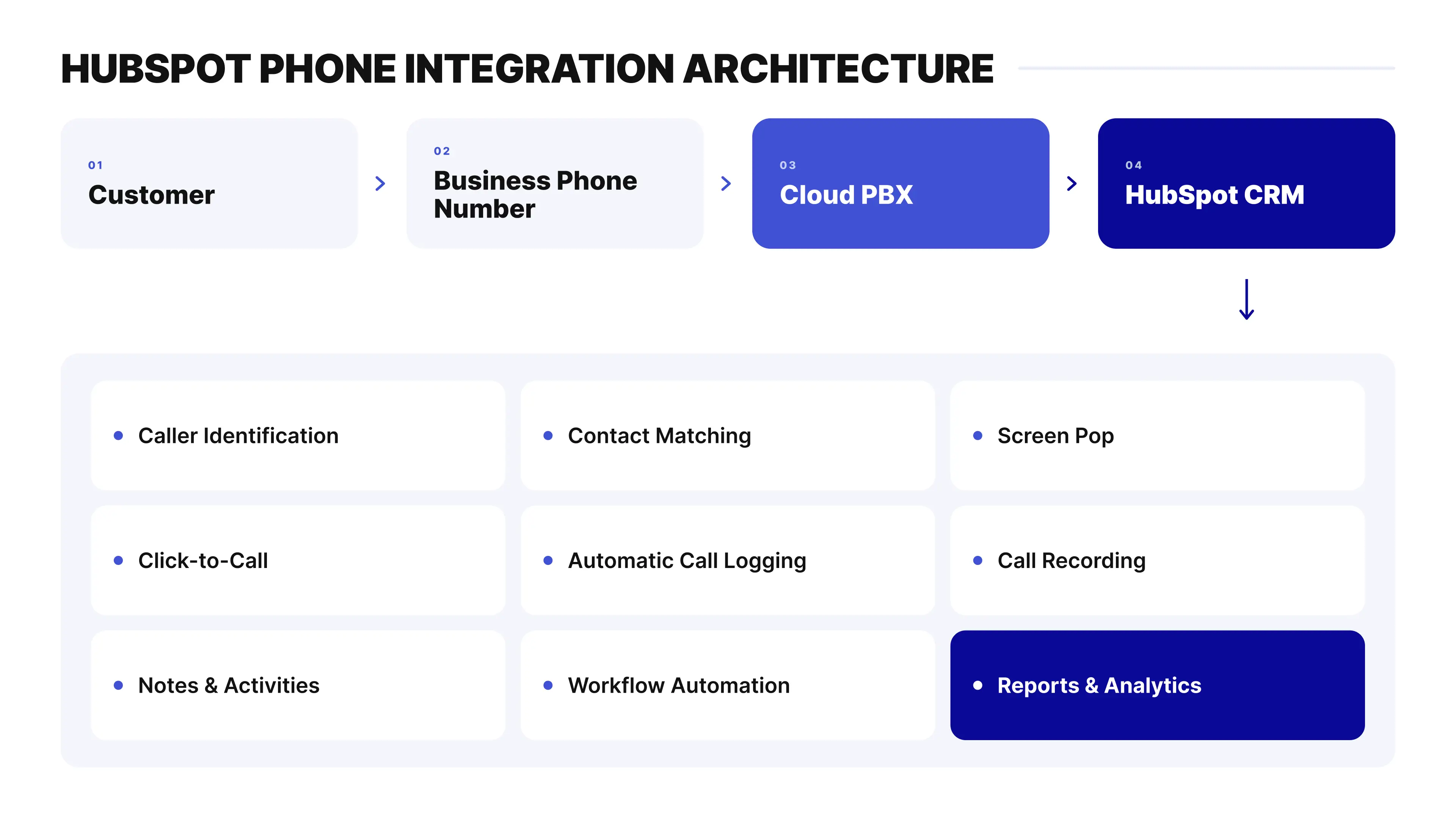
Rather than functioning as independent systems, the cloud PBX and HubSpot continuously exchange customer and communication data. Every phone event becomes part of the customer's CRM timeline while HubSpot remains the central workspace for employees.
Step-by-Step Communication Workflow
Step 1. A Customer Calls Your Business
The process begins when a customer dials your business phone number or when a sales representative starts a call directly from HubSpot using click-to-call.
Depending on your communication strategy, the number may be:
-
Local
-
National
-
Mobile
-
Toll-Free
-
International
Regardless of the number type, the call first reaches the cloud PBX.
Step 2. The Cloud PBX Processes the Call
Before the call reaches an employee, the cloud PBX evaluates routing rules configured by the business.
These rules may include:
-
Interactive Voice Response (IVR)
-
Auto Attendant
-
Ring Groups
-
Call Queues
-
Business Hours Routing
-
Holiday schedules
-
Skill-based routing
-
Call forwarding
-
Voicemail
Instead of sending every caller to the same employee, the PBX intelligently routes each conversation to the appropriate department or person.
Step 3. HubSpot Identifies the Customer
Once the PBX receives the call, the integration searches HubSpot using the incoming phone number.
If a matching record exists, HubSpot immediately retrieves:
-
Contact
-
Company
-
Deal
-
Ticket
-
Previous activities
-
Notes
-
Call history
If no matching contact exists, the integration can create a new contact automatically or prompt the employee to save the caller after the conversation.
This entire process usually takes only a fraction of a second.
Step 4. Screen Pop Appears
Before answering the phone, employees see a complete customer profile instead of an unknown number.
The screen pop may display:
-
Customer name
-
Company
-
Job title
-
Previous calls
-
Emails
-
Open deals
-
Support tickets
-
Internal notes
-
Assigned owner
-
Recent activities
Having immediate access to customer information eliminates unnecessary questions and allows employees to personalize every conversation from the very beginning.
Step 5. The Conversation Begins
The employee answers the call while continuing to work entirely within HubSpot.
During the conversation they may:
-
Update notes
-
Change deal stages
-
Schedule meetings
-
Create follow-up tasks
-
Transfer calls
-
Consult colleagues
-
Open support tickets
-
Update customer information
The cloud PBX manages the voice connection while HubSpot manages customer information.
Step 6. Call Recording (Optional)
If enabled by the organization and permitted by local regulations, the phone system automatically records the conversation.
Organizations commonly use recordings for:
-
Quality assurance
-
Sales coaching
-
Compliance
-
Internal training
-
Customer dispute resolution
The recording is automatically linked to the HubSpot record after the call ends.
Step 7. Automatic Call Logging
Once the conversation is complete, the integration synchronizes communication data with HubSpot.
Typical information includes:
-
Call direction
-
Date
-
Time
-
Duration
-
Extension
-
Assigned employee
-
Phone number
-
Call outcome
-
Recording link
-
Notes
Employees no longer need to document conversations manually.
Step 8. Workflow Automation
Phone events can immediately trigger automated HubSpot workflows.
Examples include:
-
Create follow-up tasks
-
Update deal stages
-
Assign new leads
-
Notify managers
-
Launch email sequences
-
Create support tickets
-
Schedule callbacks
Automation ensures that important customer interactions are never forgotten.
Step 9. Reports and Analytics Update Automatically
Every completed call contributes to communication dashboards.
Managers can monitor:
-
Total calls
-
Missed calls
-
Answer rate
-
Average response time
-
Average call duration
-
Queue performance
-
Agent productivity
-
Peak calling hours
-
Customer communication trends
Because every interaction is synchronized automatically, reports remain accurate without requiring employees to perform manual CRM updates.
Why This Workflow Matters
Without a HubSpot phone integration, employees often have to switch between several applications during and after each call. They search for contacts manually, create call activities, add notes, and remember to schedule the next follow-up. When call volumes increase, these small tasks take up more time and make it easier for important information to be missed.
Connecting a cloud PBX with HubSpot simplifies this workflow. Customer information can be available before the call is answered, call activity can be synchronized automatically, and recordings and notes can be linked to the relevant CRM record. HubSpot workflows can then use this data to create follow-up tasks and automate other routine actions.
This means employees spend less time updating systems and more time working with customers. At the same time, managers get more complete CRM data for tracking communication, team activity, and customer history.
For growing sales, support, and customer success teams, this creates a more scalable process while keeping HubSpot as the central source of customer information.
Benefits of Connecting HubSpot with a Cloud PBX
Connecting HubSpot CRM with a cloud PBX brings telephony, customer data, and daily workflows into the same environment.
Instead of keeping calls in one system and customer information in another, teams can connect voice interactions with the customer records they already use in HubSpot. This reduces manual work, keeps CRM data more complete, and gives sales and support teams better context for every conversation.
Reduce Manual Administration
Sales representatives and support agents can spend several minutes after each call adding notes, updating customer records, and creating follow-up tasks. Across dozens or hundreds of daily calls, that adds up quickly.
With a HubSpot phone integration, call activities, timestamps, outcomes, recordings, and notes can be synchronized with the CRM automatically. Employees spend less time documenting calls and more time speaking with customers.
Business value:
-
Less manual data entry
-
More time for customer conversations
-
Higher employee productivity
-
More complete CRM records
Give Employees Complete Customer Context
Knowing who is calling is useful. Knowing the history behind that call is much more valuable.
When a call comes in, employees can access relevant HubSpot information such as:
-
Previous conversations
-
Open deals
-
Support tickets
-
Recent emails
-
Internal notes
-
Assigned account owner
-
Customer history
This gives the employee context before or during the conversation and reduces the need for customers to repeat information they have already provided.
Business value:
-
More personalized conversations
-
Faster issue resolution
-
Better customer experience
-
Higher first-contact resolution
Improve Sales Productivity
Sales representatives should spend their time working with prospects rather than updating systems after every conversation.
Features such as click-to-call, automatic call logging, Screen Pop, and workflow automation remove many repetitive steps from the sales process. Representatives can start calls from HubSpot, work with the customer record during the conversation, and keep call activity connected to the CRM afterward.
Managers also get a clearer view of sales activity without depending entirely on manual updates from each representative.
Business value:
-
More outbound calls
-
Faster follow-up
-
Shorter sales cycles
-
More sales opportunities
Deliver Better Customer Service
For support teams, the first few seconds of a call matter.
When HubSpot is connected to a cloud PBX, agents can identify callers and review previous conversations, existing tickets, and relevant customer information without searching through separate systems.
This can reduce the time spent gathering context and make it easier to route or resolve requests correctly.
Business value:
-
Faster response times
-
Improved customer satisfaction
-
Fewer unnecessary transfers
-
More consistent service
Build a Single Customer Timeline
A customer relationship includes much more than phone calls.
HubSpot may already contain emails, meetings, tasks, notes, deals, tickets, SMS, and internal activities. Phone integration adds voice communication to this history instead of leaving it in a separate telephony platform.
For example, a sales manager reviewing a deal can see that a customer received an email, spoke with a representative, and was assigned a follow-up task without having to check several applications.
Business value:
-
More complete communication history
-
Better collaboration between teams
-
Easier handovers and employee onboarding
-
More consistent customer communication
Improve Reporting Accuracy
CRM reporting is only as useful as the data behind it.
If employees forget to record calls manually, managers are working with an incomplete picture. Automatic synchronization helps ensure that phone activity is included in HubSpot reporting without depending on employees to enter every interaction themselves.
Depending on the cloud PBX and integration, managers can work with data such as:
-
Call volume
-
Missed calls
-
Agent activity
-
Response times
-
Queue performance
-
Customer communication trends
This makes it easier to understand not only how much the team is calling, but also how communication activity relates to customer and sales processes.
Business value:
-
More reliable KPIs
-
Better forecasting
-
Improved operational visibility
-
Better-informed decisions
Support Remote and Hybrid Teams
A cloud PBX does not tie employees to a physical office phone.
With browser-based calling, mobile applications, and cloud PBX technology, employees can handle business calls from different locations while continuing to work with customer information in HubSpot.
Because call activity remains connected to the CRM, remote and office-based employees can work with the same customer history and processes.
Business value:
-
Greater workforce flexibility
-
Easier remote work
-
Consistent communication processes
-
Business communication across locations
Scale Without Increasing Complexity
Growth usually means more employees, departments, phone numbers, locations, and sometimes international markets.
Managing these changes through disconnected systems can quickly become difficult. A cloud PBX provides a more flexible way to expand telephony while keeping HubSpot at the center of customer management.
New users and communication workflows can be added as requirements change without replacing the CRM or rebuilding the entire communication process.
Whether a company grows from five employees to five hundred, the goal remains the same: keep telephony and customer data connected as the organization becomes more complex.
Business value:
-
Easier expansion
-
Centralized administration
-
Consistent communication processes
-
Long-term scalability
Why These Benefits Matter
Click-to-call, automatic call logging, IVR, call recording, and other individual features are useful. But the main value of HubSpot phone integration comes from how these capabilities work together.
A call can start from HubSpot, reach the right employee through the cloud PBX, display the relevant customer information, be recorded in the CRM, and trigger the next step in the workflow. The employee does less manual work, while the business keeps a more complete record of what happened.
That is the practical difference between simply using HubSpot alongside a phone system and actually connecting the two.
For sales, customer support, and customer success teams, the result is a communication process that is easier to manage, easier to measure, and easier to scale.
Key Features Every HubSpot Phone Integration Should Include
Not every HubSpot phone integration provides the same functionality. Some solutions cover basic calling features, while others connect HubSpot with a complete cloud communications platform that includes call routing, CRM synchronization, automation, and analytics.
When comparing solutions, don't look at each feature separately. Consider the complete workflow: how employees make and receive calls, what customer information they see, what data is saved in HubSpot, and what happens after the conversation ends.
Here are the key capabilities to consider.
Click-to-Call
Click-to-call lets employees start business calls directly from HubSpot without manually dialing a number.
Phone numbers can be clickable across contacts, companies, deals, tickets, and supported CRM records, making outbound calling faster and reducing dialing errors.
Benefits
-
Faster outbound calling
-
Fewer dialing errors
-
Improved sales productivity
-
Less manual work
Browser Calling
Modern cloud PBX platforms can support browser-based calling through WebRTC.
Employees can make and receive business calls directly from a web browser without relying on a traditional desk phone. This makes deployment easier and gives remote and hybrid teams more flexibility.
Mobile Business Calling
Employees may also need access to business telephony when they are away from their desks.
Mobile applications allow users to make and receive calls through their business extension from a smartphone while maintaining business caller ID and keeping communication connected to company workflows.
Business Phone Numbers
A HubSpot phone integration should also work with the business phone numbers your company needs.
Depending on the provider and country, these may include:
-
Local numbers
-
National numbers
-
Mobile numbers
-
Toll-Free numbers
-
International numbers
This allows companies to establish a presence in different markets while managing numbers and calls through a centralized cloud platform.
Intelligent Call Management
As call volumes increase, simply sending every incoming call to the same phone is no longer practical. A cloud PBX can apply routing rules that determine where each call should go and what should happen when the intended employee is unavailable.
Interactive Voice Response (IVR)
IVR lets callers navigate an automated phone menu before reaching an employee.
For example, customers can select sales, billing, or technical support and be routed directly to the appropriate team.
Benefits
-
Fewer unnecessary transfers
-
Faster routing
-
Better customer experience
-
Improved first-call resolution
Auto Attendant
An Auto Attendant answers incoming calls automatically and routes them according to predefined business rules.
It can handle the initial stage of the call without requiring a receptionist to manually redirect every customer.
Call Queues
When all available employees are busy, Call Queues organize incoming calls until someone becomes available.
Depending on the platform and configuration, queue management may include:
-
Estimated waiting time
-
Queue position
-
Overflow routing
-
Callback options
-
Queue reporting
This is particularly useful for sales and support teams that handle higher inbound call volumes.
Ring Groups
Ring Groups distribute calls among several employees instead of relying on a single extension.
Calls can ring multiple users simultaneously or follow predefined routing strategies, helping teams improve availability and reduce missed calls.
Business Hours Routing
Call handling often needs to change outside normal working hours.
Business Hours Routing applies different rules for evenings, weekends, holidays, and regular business hours. For example, calls can be sent to another team, voicemail, or another predefined destination when the office is closed.
CRM Synchronization Features
This is where HubSpot phone integration becomes more than simply another way to make calls.
CRM synchronization connects phone activity with customer records, reducing manual updates and giving employees a clearer history of each interaction.
Automatic Call Logging
Inbound, outbound, and missed calls can be logged automatically in HubSpot.
Depending on the integration, synchronized information may include:
-
Call direction
-
Date
-
Duration
-
Agent
-
Extension
-
Call outcome
-
Customer association
Instead of relying on employees to document every call manually, the activity becomes part of the CRM record automatically.
Caller Identification
Caller identification can match an incoming phone number with an existing HubSpot contact.
Before or during the conversation, employees can access information such as:
-
Who is calling
-
Previous communication history
-
Open deals
-
Active support tickets
The employee starts the conversation with customer context instead of only a phone number.
Screen Pop
Screen Pop automatically displays the relevant HubSpot record when an incoming call is identified.
This removes the need to search for the contact manually while the phone is ringing and gives the employee immediate access to relevant customer information.
Contact Synchronization
Contact synchronization keeps customer information aligned between HubSpot and the phone system.
Depending on the integration, synchronization may be two-way, allowing supported changes made in one platform to be reflected in the other.
The exact fields and synchronization behavior should always be checked with the provider before deployment.
Call Recording
Call recordings can be associated with the relevant customer interaction, making them easier to find when reviewing communication history.
Organizations commonly use recordings for:
-
Quality assurance
-
Coaching
-
Compliance
-
Internal training
-
Customer dispute resolution
Recording requirements, access permissions, storage, and retention should be configured according to applicable company policies and legal requirements.
Automation Features
The integration should also support what happens after the call.
Instead of relying on an employee to remember every next step, communication events can be used to start predefined CRM processes.
Workflow Automation
Call events and associated CRM data can support HubSpot workflows such as:
-
Creating follow-up tasks
-
Updating deal stages
-
Assigning leads
-
Sending notifications
-
Launching email sequences
-
Opening support tickets
The available triggers and actions depend on the specific integration and HubSpot configuration, but the principle is simple: the end of the phone call does not have to mean the start of another manual task.
APIs and Webhooks
For companies with more complex requirements, APIs and webhooks provide additional flexibility.
Developers can use them to connect communication events with custom applications, internal systems, or additional business processes while keeping HubSpot and telephony data synchronized.
Analytics and Reporting
Call data becomes much more useful when managers can connect communication activity with what is happening across the business.
Depending on the integration and reporting tools available, organizations can analyze:
-
Call volume
-
Missed calls
-
Response times
-
Average handling time
-
Agent productivity
-
Queue performance
-
Customer communication trends
This provides a more reliable view of phone activity than reports that depend entirely on employees entering every call manually.
When telephony data is combined with HubSpot CRM data, teams can also better understand what happened after the call—for example, whether an interaction was connected with a lead, deal, support request, or follow-up activity.
Administration and Security
The technical side of the integration matters just as much as the user-facing features, especially as the number of employees, phone numbers, and customer records grows.
Organizations should evaluate capabilities such as:
-
Role-based permissions
-
User management
-
Extension management
-
API authentication
-
Secure call recording storage
-
Audit logs
-
Data protection
-
Business continuity
These controls help administrators manage who can access communication data, how users and extensions are configured, and how the communication environment is maintained as the organization grows.
A strong HubSpot phone integration is therefore not defined by one feature such as click-to-call. What matters is how calling, routing, CRM synchronization, automation, analytics, and administration work together as part of the same business process.
HubSpot Native Calling vs. Cloud PBX Integration
Businesses evaluating HubSpot phone integration often ask the same question:
Is HubSpot's built-in calling enough, or should I integrate a cloud PBX?
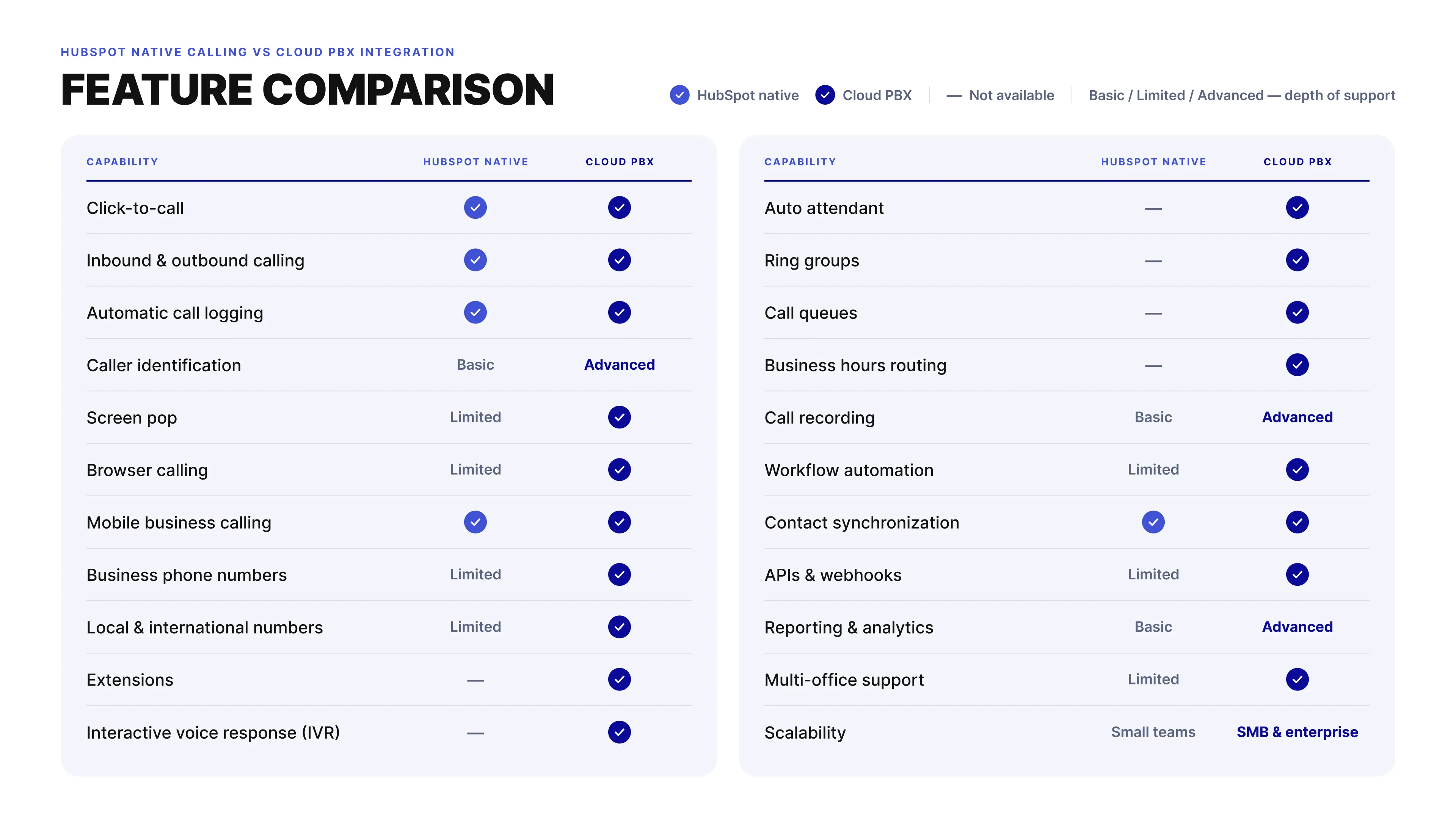
The answer depends on how your organization communicates with customers. While HubSpot's native calling capabilities are suitable for basic CRM communication, growing businesses often require additional telephony features such as intelligent call routing, browser calling, business phone numbers, advanced analytics, and workflow automation.
Rather than viewing these options as competitors, it is more useful to think of them as solutions designed for different stages of business growth.
Understanding the Difference
HubSpot Native Calling is primarily a CRM communication feature. It enables users to place and receive calls within HubSpot while recording customer interactions.
A Cloud PBX is a complete business communications platform. In addition to voice calling, it manages call routing, business phone numbers, extensions, IVR, queues, browser calling, reporting, APIs, workflow automation, and communication across multiple teams or office locations.
When integrated together, HubSpot remains the customer relationship platform, while the cloud PBX becomes the communication engine that powers voice interactions.
When HubSpot Native Calling Is the Right Choice
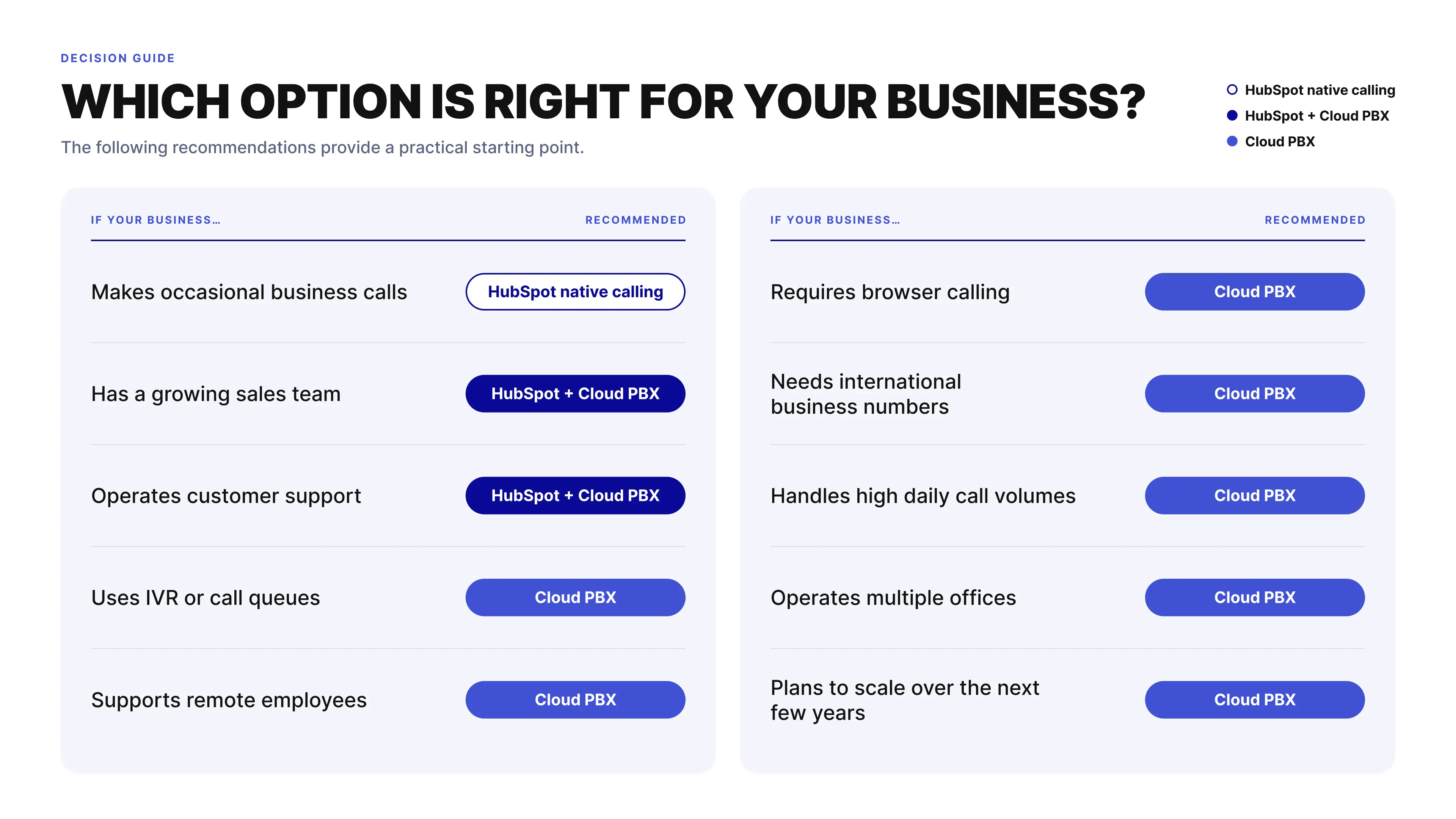
HubSpot's native calling can be enough when a business has relatively simple communication needs and wants to handle calls directly from the CRM.
It is generally a good fit for organizations that:
-
Have small sales teams.
-
Handle a relatively low volume of customer calls.
-
Primarily need click-to-call functionality.
-
Do not require advanced call routing.
-
Have relatively simple calling workflows.
-
Have limited reporting requirements.
For startups, small teams, and businesses with straightforward calling processes, native calling provides a practical way to manage customer conversations inside HubSpot without introducing a separate business phone system.
However, communication requirements often change as the business grows. More employees, higher call volumes, dedicated departments, remote teams, and international operations usually require more control over how calls are received, routed, recorded, and analyzed.
When a Cloud PBX Is the Better Choice
A cloud PBX becomes more relevant when telephony is an important part of daily sales, support, or customer service operations.
Businesses may need capabilities such as:
-
Multiple departments and extensions.
-
Dedicated sales and support teams.
-
Professional business phone numbers.
-
Browser-based calling.
-
Remote and hybrid employees.
-
IVR and Auto Attendant.
-
Ring Groups.
-
Call Queues.
-
Business Hours Routing.
-
Automatic call recording.
-
Advanced reporting.
-
Workflow automation.
-
International communications.
These capabilities allow businesses to manage more complex call flows while still keeping customer information and call activity connected to HubSpot.
The key difference is the role of each system. HubSpot remains the CRM where teams manage contacts, deals, tickets, and customer processes. The cloud PBX provides the telephony infrastructure and advanced call management capabilities.
For businesses that only need straightforward CRM calling, HubSpot's native functionality may be sufficient. For organizations that need more control over routing, numbers, queues, users, recording, and reporting, integrating HubSpot with a cloud PBX provides a more scalable communication setup.
Cost vs. Business Value
Organizations sometimes compare HubSpot Calling and a cloud PBX based only on subscription costs.
However, the real comparison should consider operational efficiency.
For example, automatic call logging, intelligent routing, workflow automation, and browser calling can save employees several minutes after every customer conversation. Across hundreds or thousands of monthly calls, these time savings often outweigh the additional cost of a dedicated communications platform.
When evaluating a solution, consider:
-
Employee productivity.
-
Customer experience.
-
Administrative workload.
-
Reporting accuracy.
-
Scalability.
-
Long-term operational efficiency.
The lowest-cost solution is not always the one that delivers the greatest business value.
 Where Teliqon Fits
Teliqon is designed for organizations that have outgrown basic CRM calling and require a complete business communications platform integrated with HubSpot.
In addition to click-to-call and automatic call logging, the platform provides cloud PBX capabilities such as browser-based calling, business phone numbers, IVR, Auto Attendant, Ring Groups, Call Queues, Business Hours Routing, call recording, workflow automation, APIs, analytics, and international communications.
Rather than replacing HubSpot, Teliqon extends its communication capabilities while allowing HubSpot to remain the central workspace for customer relationship management.
Key Takeaway
HubSpot Native Calling and a cloud PBX are not competing technologies—they solve different business needs.
Native calling is well suited to organizations with straightforward communication requirements and smaller teams. A cloud PBX becomes increasingly valuable as customer interactions grow in volume and complexity, providing the routing, automation, analytics, and scalability that modern businesses need.
The right choice should be based not only on current requirements but also on how your communication strategy is expected to evolve as your organization grows.
Which HubSpot Phone Solution Is Right for Your Business?
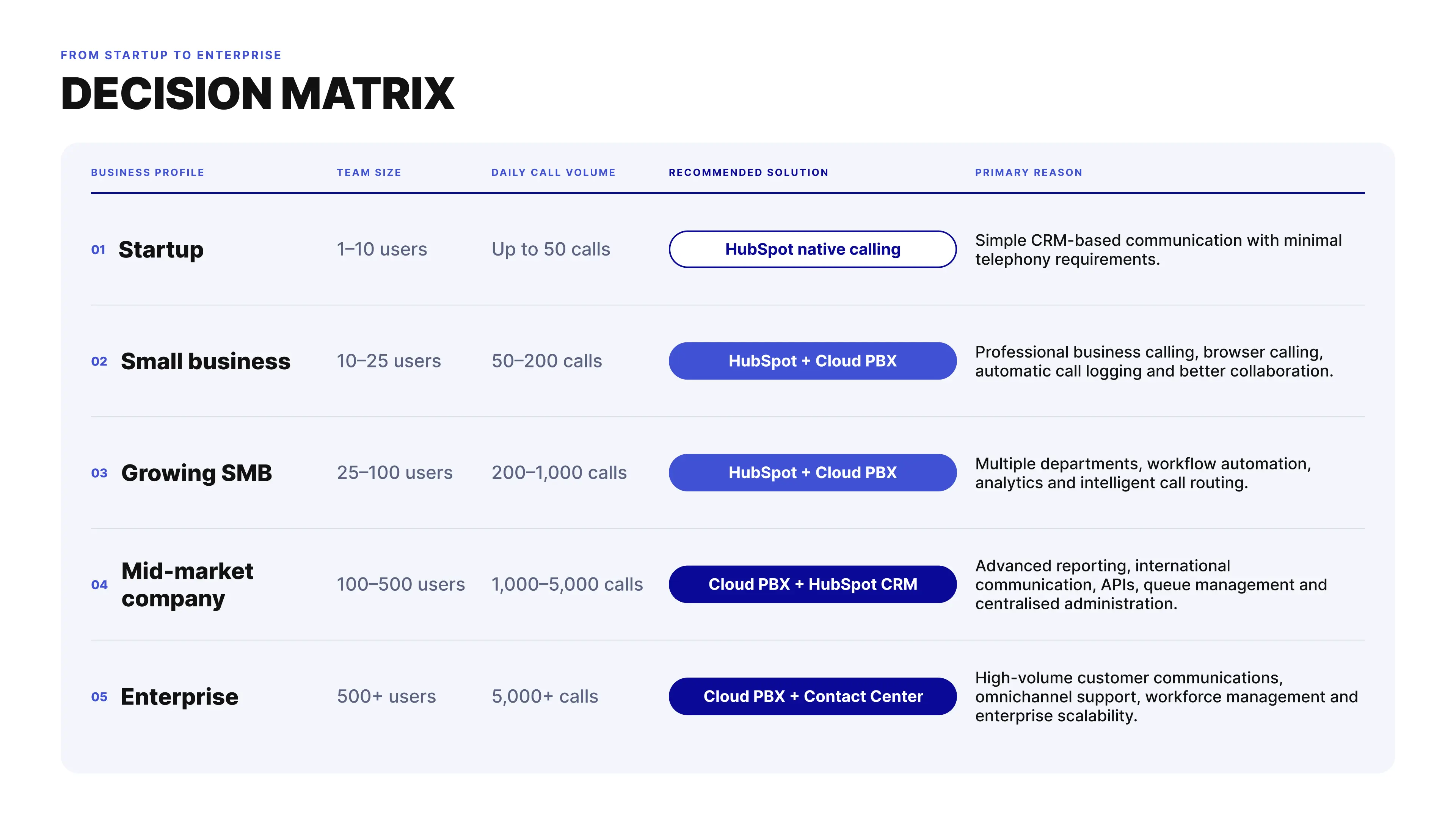
There is no single HubSpot phone solution that works for every organization. The right choice depends on how your team uses phone communication today and how those requirements may change as the business grows.
A startup making a few customer calls each day may be well served by HubSpot's native calling features. A company with multiple sales teams, support departments, remote employees, or international operations will usually need more advanced telephony capabilities, such as IVR, Call Queues, Ring Groups, business phone numbers, call recording, and advanced routing.
The table below provides a practical way to compare the options based on your business requirements rather than individual features.
Choose Based on Your Communication Complexity
While company size is a useful reference point, communication complexity is often a more important decision factor.
For example:
-
A 15-person software company handling hundreds of customer demos each week may require a cloud PBX.
-
A 200-person manufacturing company with very few daily calls may find HubSpot Native Calling sufficient.
-
A growing customer support team will typically benefit from advanced routing and queue management long before reaching enterprise scale.
Instead of asking "How many employees do we have?", ask:
-
How many customer calls do we manage every day?
-
How many employees answer business calls?
-
Do customers need to reach different departments?
-
Do we support customers in multiple countries?
-
Are remote or hybrid employees part of our workforce?
-
Do we need workflow automation after every conversation?
The answers to these questions usually provide a clearer indication of the right communication platform than company size alone.
Signs You've Outgrown Basic CRM Calling
When You Have Outgrown Basic CRM Calling
Many organizations start with HubSpot's native calling capabilities and move to a cloud PBX when their communication needs become more complex.
You may have outgrown basic CRM calling if your organization:
-
Handles more than a few dozen customer calls each day.
-
Has dedicated sales and customer support teams.
-
Uses multiple departments or office locations.
-
Needs Interactive Voice Response (IVR).
-
Requires Call Queues or Ring Groups.
-
Wants browser-based business calling.
-
Requires business phone numbers in multiple countries.
-
Needs automatic call recording.
-
Relies on detailed communication analytics.
-
Uses workflow automation to manage customer interactions.
When several of these requirements become part of daily operations, a cloud PBX can provide more control over how calls are routed, managed, recorded, and connected with customer data in HubSpot.
Questions to Ask Before Choosing a Provider
Not every HubSpot phone integration works in the same way. Before choosing a provider, check how the integration works in practice and whether it supports the communication processes your team already uses.
Ask questions such as:
-
Is the integration native or provided through a third-party connector?
-
Does it automatically log inbound, outbound, and missed calls?
-
Does it support browser and mobile calling?
-
Are call recordings linked to HubSpot records?
-
Does it provide caller identification and Screen Pop?
-
Are contacts synchronized automatically?
-
Does it include IVR, Auto Attendant, Ring Groups, and Call Queues?
-
Are workflow automation and APIs available?
-
Can the platform support additional users, departments, locations, and phone numbers as the business grows?
-
Is pricing transparent and predictable?
It is also worth checking exactly what data is synchronized with HubSpot and what happens after each call. A long feature list is useful, but the real test is whether the integration removes manual steps from everyday sales and support workflows.
Where Teliqon Fits
Teliqon is designed for organizations that need more than basic CRM calling but do not want to manage the complexity of a traditional on-premises PBX.
The platform connects HubSpot CRM with cloud PBX capabilities such as browser-based calling, automatic call logging, intelligent call routing, IVR, Call Queues, Ring Groups, business phone numbers, workflow automation, analytics, APIs, and international communications.
In practice, this means HubSpot continues to manage customer relationships, deals, tickets, and CRM workflows, while Teliqon manages the telephony side of the process. Calls and relevant communication data can then become part of the customer workflow instead of remaining in a separate phone system.
This setup is particularly useful for growing sales and support teams, distributed organizations, and businesses operating across multiple markets that need their telephony infrastructure to scale with their customer base.
Key Takeaway
The right HubSpot phone solution is not determined by company size alone. A ten-person sales team handling hundreds of calls may need more advanced telephony than a much larger organization where phone communication plays a smaller role.
For straightforward communication needs, HubSpot's native calling capabilities may be sufficient. When a business needs IVR, Call Queues, Ring Groups, international business phone numbers, advanced routing, automatic call recording, analytics, or more complex communication workflows, integrating HubSpot with a cloud PBX becomes a more practical option.
The final decision should therefore come down to one question: Does the phone solution support the way your team actually communicates with customers?
Choose based on your current call workflows, the level of automation you need, and how those requirements are likely to change as the business grows.
How to Choose the Best HubSpot Phone System
Selecting a phone system for HubSpot is a long-term business decision rather than simply choosing another software subscription.
Before making a decision, evaluate how each provider supports your business processes—not just which features appear on a pricing page.
1. Choose a Native HubSpot Integration
The first question to ask any provider is how the integration works.
A native HubSpot integration is generally easier to deploy, more reliable, and better maintained than custom connectors or middleware.
Native integrations typically provide:
-
Faster synchronization
-
Better long-term compatibility
-
More complete CRM functionality
-
Fewer deployment issues
-
Simpler administration
If an integration depends on multiple third-party connectors, ask who maintains them and how updates are managed.
2. Evaluate Communication Capabilities
Business communication extends far beyond making and receiving phone calls.
A modern cloud communications platform should support:
-
Browser calling
-
Mobile applications
-
Business phone numbers
-
Call recording
-
Voicemail
-
Business Hours Routing
-
Ring Groups
-
Interactive Voice Response (IVR)
-
Auto Attendant
-
Call Queues
-
Conference calling
These capabilities become increasingly valuable as organizations expand their sales and customer support operations.
3. Look Beyond Click-to-Call
Many providers highlight click-to-call as their primary feature.
While useful, click-to-call alone provides only a small part of a complete communication workflow.
A comprehensive HubSpot integration should also include:
-
Automatic call logging
-
Caller identification
-
Screen pop
-
Contact synchronization
-
Call recording
-
Workflow automation
-
Communication history
These capabilities reduce manual work and create a more complete customer experience.
4. Review CRM Synchronization
Accurate CRM data depends on reliable synchronization.
A high-quality integration should automatically synchronize:
-
Contacts
-
Companies
-
Deals
-
Tickets
-
Call activities
-
Notes
-
Recordings
-
Customer timelines
The less information employees must enter manually, the more accurate your CRM becomes.
5. Consider Workflow Automation
Modern CRM platforms are designed to automate repetitive work.
Phone events should be able to trigger actions such as:
-
Creating follow-up tasks
-
Updating pipeline stages
-
Assigning leads
-
Launching email sequences
-
Sending internal notifications
-
Creating support tickets
Workflow automation helps ensure that customer communication continues after every conversation without relying on manual processes.
6. Assess Reporting and Analytics
Communication data provides valuable operational insights.
When comparing providers, review the reporting capabilities available for:
-
Total calls
-
Missed calls
-
Response times
-
Agent productivity
-
Queue performance
-
Call duration
-
Customer interaction trends
Accurate analytics support better staffing decisions, process improvements, and performance management.
7. Verify Scalability
Communication requirements rarely remain static.
Choose a provider that can support:
-
Additional employees
-
New departments
-
Multiple office locations
-
International expansion
-
Higher call volumes
-
Remote and hybrid teams
A scalable platform reduces the need for future system replacements as your business grows.
8. Evaluate Security and Compliance
Business phone systems frequently process sensitive customer information.
Review the provider's approach to:
-
Voice encryption
-
Secure authentication
-
Role-based permissions
-
Call recording security
-
API authentication
-
Audit logging
-
Data protection
-
Compliance with regional regulations
Security should be considered a core evaluation criterion rather than an optional feature.
9. Review APIs and Integration Options
Many organizations extend HubSpot beyond standard CRM functionality.
If your business uses additional software platforms, verify that the provider offers:
-
REST APIs
-
Webhooks
-
Developer documentation
-
Third-party integrations
-
Automation platform compatibility
Open APIs provide greater flexibility for future business requirements.
10. Compare Total Business Value
Subscription pricing tells only part of the story.
A lower-cost solution may require employees to perform manual administrative work every day, while a more capable platform can automate many of those tasks.
When evaluating providers, consider:
-
Time saved through automation.
-
Employee productivity.
-
CRM accuracy.
-
Customer experience.
-
Reporting quality.
-
Scalability.
-
Long-term operational costs.
The solution with the greatest business value is not always the one with the lowest monthly subscription.
Questions to Ask Every Provider
Before making a final decision, compare providers using the same questions. This helps you understand not only which features are available, but how the HubSpot phone integration will work in daily operations.
Ask each provider:
-
Is the HubSpot integration native, or does it require a third-party connector?
-
How quickly are customer records synchronized between the phone system and HubSpot?
-
Does automatic call logging cover inbound, outbound, and missed calls?
-
Are call recordings linked to the correct CRM records?
-
Does the platform support browser and mobile calling?
-
Are IVR, Auto Attendant, Ring Groups, and Call Queues included?
-
Can phone events trigger HubSpot workflows?
-
Are APIs and webhooks available for custom integrations and automation?
-
Does the platform support international business phone numbers?
-
How does pricing change as the number of users, phone numbers, or locations grows?
A consistent evaluation framework makes providers easier to compare. More importantly, it helps determine whether an integration will actually fit your existing HubSpot workflows and continue to support them as your communication requirements grow.
Who Benefits Most from HubSpot Phone Integration?
HubSpot phone integration can support many types of businesses, but it becomes especially valuable when customer calls are a regular part of sales, support, or account management. The more conversations a team handles, the more important it becomes to keep telephony and CRM data connected.
Businesses with Active Sales Teams
Sales teams depend on speed, consistent follow-up, and access to complete customer information.
Representatives may make dozens of outbound calls each day while managing leads, deals, and follow-up activities in HubSpot. When telephony is integrated with the CRM, they can:
-
Call prospects directly from HubSpot.
-
Identify inbound callers instantly.
-
Automatically log call activity.
-
Schedule follow-up activities.
-
Update deals without leaving the CRM.
-
Review previous customer interactions before a conversation.
This is particularly useful for SaaS companies, B2B software vendors, professional services firms, technology providers, and business consulting companies where phone conversations are an important part of the sales process.
Customer Support Organizations
Support teams often handle a continuous flow of inbound requests. Without integrated communications, agents may need to search for the customer, open the relevant ticket, and reconstruct previous interactions while the caller waits.
A cloud PBX integrated with HubSpot can help support teams:
-
Identify customers before answering.
-
Access existing tickets immediately.
-
Route calls to the appropriate department.
-
Record conversations automatically.
-
Maintain a complete communication history.
-
Trigger follow-up workflows after the call.
These capabilities are particularly relevant for software vendors, healthcare providers, financial services companies, telecommunications businesses, and managed service providers.
Customer Success Teams
Customer Success Managers use calls differently from sales teams. Their focus is usually on onboarding, adoption, retention, renewals, and account growth.
Connecting HubSpot with a cloud PBX gives the team access to previous conversations, implementation progress, support history, and renewal activities alongside the call itself.
Common use cases include:
-
Onboarding calls
-
Quarterly business reviews
-
Renewal discussions
-
Product adoption meetings
-
Customer health checks
This makes it easier to understand the complete account history before speaking with a customer and to keep the outcome of each conversation connected to the CRM.
Organizations Managing Multiple Departments
As a company grows, the same customer may communicate with sales, support, finance, operations, and customer success.
Without integration, each department can end up with a different part of the customer's communication history.
A HubSpot phone integration connects phone activity with the shared customer timeline. This gives different departments access to the same context and reduces duplicate work, repeated questions, and inconsistent communication.
Companies with Remote or Hybrid Teams
For distributed teams, business communication needs to work beyond the office.
Cloud PBX platforms can provide browser-based and mobile business calling while keeping communication synchronized with HubSpot. Employees can work from home, another office, or while traveling without relying on personal phone numbers or disconnected calling applications.
The customer still contacts the business through its professional communication channels, while employees continue working with the same HubSpot records and workflows.
Businesses Expanding Internationally
Entering a new market often creates another requirement: local or international business phone numbers.
A cloud PBX can allow organizations to manage numbers across multiple countries through a centralized platform while keeping customer relationships and call activity connected to HubSpot.
For international sales and support teams, this means new markets do not necessarily require separate communication systems for each location.
Organizations Handling High Call Volumes
The value of integration becomes even clearer when a business handles hundreds or thousands of calls each month.
At this scale, manual call management becomes difficult to maintain. Organizations typically need capabilities such as:
-
Intelligent call routing.
-
Interactive Voice Response (IVR).
-
Call Queues.
-
Ring Groups.
-
Automatic call logging.
-
Workflow automation.
-
Advanced analytics.
These tools help manage higher call volumes while HubSpot keeps the resulting customer activity connected to leads, deals, tickets, and other CRM records.
Industries That Benefit Most
HubSpot phone integration is not limited to a particular industry. It is most useful where phone conversations have a direct role in sales, service, customer retention, or daily operations.
Common examples include:
-
Software and SaaS
-
Information Technology
-
Professional Services
-
Healthcare
-
Financial Services
-
Insurance
-
Real Estate
-
Education
-
Manufacturing
-
Logistics
-
Telecommunications
-
Hospitality
-
Marketing Agencies
-
Consulting Firms
-
Customer Support Centers
The common factor is not the industry itself. It is how important phone communication is to the customer journey.
If calls regularly create leads, move deals forward, resolve support requests, or influence customer retention, connecting telephony with HubSpot gives those conversations the same structure and visibility as the rest of the customer data.
Is HubSpot Phone Integration Right for Your Business?
A HubSpot phone integration is likely to deliver significant value if your organization answers customer calls every day, relies on sales conversations to generate revenue, provides ongoing customer support, or manages long-term client relationships.
If your teams frequently switch between a CRM and a separate phone system, manually document conversations, or struggle with incomplete customer records, integrating a cloud PBX with HubSpot can help eliminate these inefficiencies.
Organizations experiencing rapid growth, supporting remote employees, expanding internationally, or handling increasing call volumes typically benefit the most from a unified communications platform.
Where Teliqon Fits
Teliqon is designed for organizations that require business communications to operate as an integrated part of HubSpot CRM rather than as a separate application.
By combining cloud PBX capabilities with native HubSpot integration, the platform supports sales, customer support, customer success, and account management teams through features such as browser-based calling, intelligent routing, automatic call logging, call recording, workflow automation, analytics, APIs, and international business phone numbers.
This approach enables businesses to centralize customer communications while creating scalable processes that support long-term growth.
Real-World Use Cases of HubSpot Phone Integration
Understanding the features of a HubSpot phone integration is important, but the real value becomes clear when those capabilities are applied to everyday business operations.
Whether the goal is generating more leads, improving customer support, increasing operational efficiency, or strengthening long-term customer relationships, integrating a cloud PBX with HubSpot helps teams communicate more effectively while reducing manual work.
The following examples illustrate how organizations typically use HubSpot phone integration throughout the customer lifecycle.
Use Case 1. Converting Website Visitors into Sales Opportunities
A prospective customer visits your website and requests a product demonstration.
Within minutes, a sales representative calls the prospect directly from HubSpot using click-to-call.
Before the conversation begins, HubSpot displays any available customer information, previous marketing interactions, and submitted forms.
During the call, the representative qualifies the opportunity, creates a deal, schedules a demonstration, and records important notes.
When the call ends, HubSpot automatically:
-
Logs the conversation
-
Stores the call outcome
-
Creates follow-up tasks
-
Updates the sales pipeline
-
Launches an automated email sequence
Business outcome
-
Faster lead response
-
Higher conversion rates
-
Consistent sales process
-
Complete CRM history
Use Case 2. Managing High-Volume Sales Teams
A growing sales organization may process hundreds of outbound calls every day.
Without automation, representatives spend significant time documenting conversations instead of speaking with prospects.
By integrating HubSpot with a cloud PBX, the sales workflow becomes largely automated.
Representatives can:
-
Call directly from HubSpot
-
View customer history instantly
-
Automatically log conversations
-
Schedule follow-up activities
-
Update deals during the call
Managers gain real-time visibility into sales performance without relying on manual CRM updates.
Business outcome
-
Increased sales productivity
-
Improved pipeline visibility
-
Reduced administrative work
-
More customer conversations
Use Case 3. Delivering Faster Customer Support
A customer contacts the support team regarding an existing issue.
Before answering, the support agent immediately sees:
-
Customer information
-
Previous calls
-
Open support tickets
-
Recent emails
-
Internal notes
-
Assigned account owner
The conversation continues without requiring the customer to repeat information already stored in HubSpot.
After the call, the system automatically updates the ticket, stores call notes, and creates any necessary follow-up tasks.
Business outcome
-
Faster issue resolution
-
Improved first-contact resolution
-
Better customer experience
-
Consistent support history
Use Case 4. Customer Onboarding
New customers often require several onboarding calls after purchasing a product or service.
Using HubSpot phone integration, Customer Success Managers can review implementation progress before every conversation while automatically documenting onboarding milestones.
Each completed call updates the customer's timeline and triggers the next onboarding activity through HubSpot workflows.
Business outcome
-
Structured onboarding process
-
Better customer adoption
-
Reduced onboarding delays
-
Higher customer retention
Use Case 5. Managing Renewals and Account Growth
Existing customers require regular communication throughout their lifecycle.
Account Managers use HubSpot phone integration to prepare for renewal conversations by reviewing:
-
Previous meetings
-
Call history
-
Customer notes
-
Product usage discussions
-
Open opportunities
During the conversation they can identify upsell opportunities, discuss future requirements, and schedule follow-up meetings.
Everything becomes part of the customer's communication history automatically.
Business outcome
-
Higher renewal rates
-
Increased expansion revenue
-
Better account visibility
-
Stronger customer relationships
Use Case 6. Supporting Remote Sales Teams
Many organizations operate with employees working from different cities or countries.
Cloud PBX technology allows every representative to use the same business phone system through browser-based or mobile calling.
Regardless of employee location, all communication remains synchronized with HubSpot.
Managers continue receiving consistent reporting while customers experience the same professional communication regardless of where employees are located.
Business outcome
-
Consistent remote communication
-
Simplified workforce management
-
Improved collaboration
-
Business continuity
Use Case 7. Coordinating Multiple Departments
Customer communication rarely involves only one team.
Sales, customer support, finance, implementation, and customer success often work with the same customer throughout the relationship.
Without integration, communication becomes fragmented.
With HubSpot phone integration, every department works from the same communication timeline.
Phone conversations, notes, activities, recordings, and follow-up actions remain available to authorized employees across the organization.
Business outcome
-
Better collaboration
-
Reduced duplicate work
-
Consistent customer experience
-
Improved internal communication
Use Case 8. International Business Communications
Organizations serving customers across multiple countries often need local business phone numbers while maintaining centralized communication management.
A cloud PBX allows businesses to establish a local presence in different markets while continuing to manage customer interactions through HubSpot.
Employees can answer calls from international customers using the same communication platform regardless of office location.
Business outcome
-
Simplified international operations
-
Local customer experience
-
Centralized communication management
-
Scalable global growth
Common Results Businesses Achieve
Although every organization has unique communication requirements, businesses implementing HubSpot phone integration commonly report improvements in several operational areas.
These include:
-
Less manual CRM administration
-
Faster customer response times
-
Improved communication consistency
-
Better collaboration across departments
-
More accurate reporting
-
Higher employee productivity
-
Increased visibility into customer interactions
-
Better customer experience throughout the lifecycle
The exact results depend on organizational processes, communication volume, and the capabilities of the selected cloud PBX platform.
Where Teliqon Fits
Teliqon supports each of these business scenarios by combining cloud PBX capabilities with native HubSpot CRM integration.
Organizations can manage inbound and outbound communications, browser calling, business phone numbers, IVR, Call Queues, automatic call logging, workflow automation, analytics, APIs, and customer communication history from a single cloud platform.
Rather than focusing on individual features, the platform is designed to support complete communication workflows across sales, customer support, customer success, and account management teams.
Best Practices for Implementing HubSpot Phone Integration
Implementing a HubSpot phone integration is not only about connecting a cloud PBX to your CRM. The greatest value comes from designing communication workflows that improve customer experience, reduce manual work, and provide reliable business data over the long term.
The following best practices can help maximize the value of your HubSpot phone integration.
1. Design Your Call Flow Before Deployment
One of the most common implementation mistakes is configuring the phone system before defining how customer calls should be handled.
Before connecting HubSpot with your cloud PBX, map the customer journey from the moment a call is received until every follow-up activity has been completed.
Consider questions such as:
-
Which department should answer first?
-
When should IVR be used?
-
Which calls require queues?
-
Which conversations should be recorded?
-
Which phone events should trigger workflows?
Why it matters
Well-designed call flows reduce transfers, improve response times, and create a more consistent customer experience.
2. Keep Customer Data Clean
Caller identification depends on accurate customer information.
If phone numbers are stored using inconsistent formats or duplicate contacts exist, caller matching becomes less reliable.
Establish clear CRM data standards before enabling automatic synchronization.
Best practice
-
Store phone numbers in international format (E.164).
-
Merge duplicate contacts regularly.
-
Archive inactive records.
-
Validate imported customer data.
Clean CRM data improves caller identification, reporting, and workflow accuracy.
3. Automate Routine Tasks
Employees should spend their time communicating with customers—not documenting conversations.
Configure HubSpot workflows to automate repetitive activities such as:
-
Creating follow-up tasks
-
Scheduling callbacks
-
Updating deal stages
-
Assigning leads
-
Creating support tickets
-
Sending internal notifications
Why it matters
Automation reduces administrative work while ensuring that important customer interactions are never forgotten.
4. Use Intelligent Call Routing
Not every customer should reach the same employee.
Configure routing based on business requirements using:
-
Interactive Voice Response (IVR)
-
Auto Attendant
-
Ring Groups
-
Call Queues
-
Business Hours Routing
-
Skill-based routing
Why it matters
Intelligent routing improves first-contact resolution, reduces waiting times, and connects customers with the most appropriate employee from the beginning.
5. Give Employees Complete Customer Context
A phone integration should do more than identify callers.
Employees should have immediate access to:
-
Previous calls
-
Emails
-
Deals
-
Tickets
-
Internal notes
-
Recent activities
This allows conversations to continue naturally without requiring customers to repeat information.
Why it matters
Complete customer context improves service quality while reducing call handling time.
6. Monitor Communication Performance
Implementation should not end after deployment.
Managers should regularly review communication metrics to identify opportunities for improvement.
Recommended KPIs include:
-
Call volume
-
Missed calls
-
Average response time
-
Average handling time
-
Queue waiting time
-
First-contact resolution
-
Agent productivity
Why it matters
Continuous monitoring supports operational improvements based on measurable business data rather than assumptions.
7. Protect Customer Information
Business phone systems frequently process confidential customer information.
Review your security policies for:
-
User permissions
-
Call recordings
-
API credentials
-
Authentication methods
-
Access logging
-
Data retention
Best practice
Grant employees access only to the information required for their responsibilities and review permissions periodically.
8. Test Your Integration Regularly
Communication environments change over time.
New employees, departments, workflows, phone numbers, and CRM updates can affect system behavior.
Create a standard testing checklist after significant configuration changes.
Verify:
-
Inbound calling
-
Outbound calling
-
Caller identification
-
Screen Pop
-
Automatic call logging
-
Contact synchronization
-
Call recording
-
Workflow automation
-
IVR routing
-
Queue functionality
Why it matters
Routine testing helps identify configuration issues before they affect customers.
9. Train Employees to Use the Integration
Technology delivers value only when employees understand how to use it effectively.
Provide practical training covering:
-
Browser calling
-
Click-to-call
-
Call notes
-
CRM updates
-
Workflow automation
-
Customer timelines
-
Reporting dashboards
Encourage teams to use HubSpot as their primary communication workspace rather than switching between multiple applications.
Why it matters
Consistent user adoption improves CRM accuracy and maximizes the return on your communication platform.
10. Continuously Optimize Communication Workflows
Customer expectations, team structures, and business processes evolve over time.
Review your communication workflows regularly to identify opportunities for improvement.
Questions to ask include:
-
Are calls reaching the right teams?
-
Are customers waiting too long?
-
Which workflows remain manual?
-
Are reports providing useful insights?
-
Can additional automation be introduced?
Continuous optimization helps organizations improve efficiency while maintaining a consistent customer experience as the business grows.
Best Practices Checklist
Use this checklist to evaluate your implementation.
✅ Define communication workflows before deployment.
✅ Standardize customer phone numbers.
✅ Enable automatic call logging.
✅ Configure IVR and intelligent routing.
✅ Automate follow-up activities.
✅ Review communication analytics regularly.
✅ Protect API credentials and call recordings.
✅ Test routing and workflows after every major change.
✅ Train employees to use HubSpot as their primary communication workspace.
✅ Review and optimize communication processes continuously.
Why Businesses Consider Teliqon for HubSpot Integration
Choosing a HubSpot phone integration is about more than adding voice calls to the CRM. Businesses also need to consider how calls are routed, what information is synchronized with HubSpot, which tasks can be automated, and whether the communication setup can grow with the company.
Teliqon combines Cloud PBX capabilities with HubSpot CRM integration, bringing business telephony and customer data into the same workflow. HubSpot remains the central workspace for customer relationships, while Teliqon provides the communication infrastructure behind calls.
Built Around HubSpot Workflows
Teliqon connects telephony with the HubSpot workflows employees already use instead of requiring teams to manage customer communication in a completely separate environment.
Depending on the configured workflow, teams can:
-
Make and receive business calls.
-
View customer information when handling calls.
-
Log call activity automatically.
-
Keep communication connected with customer records.
-
Work with deals and follow-up tasks in HubSpot.
-
Access call recordings.
-
Use call events as part of automated workflows.
For employees, this means less switching between the phone system and CRM and fewer manual steps after each conversation.
Cloud PBX Capabilities Beyond Basic Calling
For teams that need more than basic CRM calling, Teliqon adds Cloud PBX functionality to the HubSpot environment.
Available telephony capabilities include:
-
Interactive Voice Response (IVR)
-
Auto Attendant
-
Call Queues
-
Ring Groups
-
Business Hours Routing
-
Browser-based calling
-
Mobile applications
-
Business extensions
-
Voicemail
-
Conference calling
-
Call forwarding
These features become particularly important as call volumes grow or when a business has several departments with different routing requirements.
For example, an incoming customer call can first pass through an IVR, enter the appropriate queue, reach the relevant employee, and then become part of the customer's activity history in HubSpot.
Automation That Reduces Manual Work
A useful CRM integration should reduce the amount of information employees need to enter after every call.
Teliqon can synchronize communication data such as:
-
Inbound calls
-
Outbound calls
-
Missed calls
-
Call duration
-
Call direction
-
Assigned user
-
Call recordings
-
Customer activities
This gives HubSpot a more complete record of phone interactions and reduces dependence on manual call logging.
Phone events can also be used with HubSpot workflows to support follow-up tasks, deal updates, notifications, and other automated processes. Instead of relying on an employee to remember every next step, the call can become part of the workflow itself.
Designed for Growing Organizations
Communication requirements rarely stay the same as a company grows.
A five-person sales team may initially need straightforward calling and automatic logging. Later, the same company may add a support department, remote employees, additional phone numbers, international markets, or more complex routing rules.
Teliqon supports this growth through centralized administration, browser-based calling, international business numbers, intelligent routing, and cloud-based deployment.
The business can expand its communication setup while continuing to use HubSpot for its existing CRM processes.
One Customer History Across Teams
Sales, support, and Customer Success may all communicate with the same customer, but they should not have to build separate histories of those interactions.
Connecting Teliqon with HubSpot helps keep phone communication associated with the customer information teams already use, including:
-
Customer records
-
Previous conversations
-
Call recordings
-
Communication history
-
Deals
-
Support activities
-
Follow-up tasks
A sales representative can review previous interactions before calling a prospect. A support agent can work with existing customer information during an inbound call. A Customer Success Manager can review communication history before a renewal or onboarding conversation.
The value is not simply having telephony and CRM available at the same time. It is having both systems contribute to the same customer workflow.
Built for Sales, Support, and Customer Success
Different teams need different things from business telephony.
Sales teams may prioritize outbound calling, fast access to customer records, and automatic activity tracking. Support teams typically need caller identification, routing, queues, and access to previous interactions. Customer Success teams rely on communication history when managing onboarding, adoption, renewals, and long-term accounts.
Teliqon provides these communication capabilities through the same Cloud PBX platform while HubSpot continues to manage the CRM side of each process.
Flexible Integration Through APIs
Some communication workflows extend beyond HubSpot.
Teliqon provides APIs and webhooks that developers can use to connect communication events with internal systems, third-party applications, automation tools, and custom business processes.
This is useful for organizations with more complex requirements that cannot be handled through a standard CRM workflow alone.
Suitable for International Operations
International growth adds another layer to business telephony. Companies may need phone numbers in different markets while still wanting one system for administration and customer communication.
Teliqon supports international business communications through its cloud infrastructure and business phone numbers across multiple markets. Distributed teams can therefore manage calls through the same communication environment while continuing to work with customer information in HubSpot.
For businesses comparing HubSpot phone integrations, the main question is not simply whether a provider can make calls from the CRM. It is whether the platform can connect telephony, CRM data, routing, automation, and international communication in a way that matches how the organization actually works.
Who Is Teliqon Best Suited For?
Teliqon is particularly well suited for organizations that:
-
Use HubSpot as their primary CRM.
-
Have dedicated sales or customer support teams.
-
Require browser-based business calling.
-
Need intelligent call routing.
-
Want to automate CRM updates.
-
Operate remote or hybrid teams.
-
Serve customers internationally.
-
Expect communication requirements to grow over time.
Rather than focusing on a single feature, the platform is designed to support complete communication workflows throughout the customer lifecycle.
How to Connect HubSpot with a Cloud PBX
Connecting HubSpot with a cloud PBX is typically a straightforward process, but a successful implementation requires more than simply authorizing two applications to communicate. Before enabling the integration, organizations should define their communication workflows, prepare customer data, and determine how phone activity should be synchronized with HubSpot.
The implementation process generally follows the same sequence regardless of the cloud PBX provider, although individual configuration options may vary.
Step 1. Define Your Communication Requirements
Before configuring the integration, identify how your organization uses business communications today and how those workflows should operate after deployment.
Consider questions such as:
-
Which teams will use the phone system?
-
How many users require business extensions?
-
Will employees work from the office, remotely, or both?
-
Which countries require business phone numbers?
-
Which calls should be recorded?
-
Which events should trigger HubSpot workflows?
Defining these requirements early helps avoid unnecessary configuration changes later.
Step 2. Prepare Your HubSpot CRM
A phone integration works best when customer data is accurate and well organized.
Before connecting your cloud PBX:
-
Remove duplicate contacts.
-
Standardize phone numbers using international (E.164) format.
-
Verify contact ownership.
-
Review existing workflows.
-
Clean outdated records.
-
Confirm user permissions.
Accurate CRM data improves caller identification, contact matching, reporting, and workflow automation.
Step 3. Connect Your Cloud PBX to HubSpot
Most modern cloud PBX platforms provide a native HubSpot integration that can be connected through a secure authorization process.
During this step you typically:
-
Sign in to your HubSpot account.
-
Authorize the integration.
-
Select the HubSpot portal.
-
Grant the required permissions.
-
Connect user accounts.
-
Verify synchronization.
Once authorization is complete, HubSpot and the phone system begin exchanging communication data.
Step 4. Configure Business Phone Numbers and Extensions
After connecting the platforms, configure the communication environment.
Typical tasks include:
-
Assign business phone numbers.
-
Create user extensions.
-
Configure departments.
-
Set caller ID.
-
Define outbound calling rules.
-
Configure voicemail.
Organizations operating internationally may also assign local or toll-free numbers for different countries.
Step 5. Configure Call Routing
Efficient communication depends on intelligent routing.
Most cloud PBX platforms allow administrators to configure:
-
Interactive Voice Response (IVR)
-
Auto Attendant
-
Ring Groups
-
Call Queues
-
Business Hours Routing
-
Holiday schedules
-
Call forwarding
-
Overflow routing
These rules ensure customers are connected with the appropriate employee or department as quickly as possible.
Step 6. Enable CRM Sync
Once the communication environment is configured, define which information should be synchronized with HubSpot.
Typical synchronization options include:
-
Inbound calls
-
Outbound calls
-
Missed calls
-
Call duration
-
Call direction
-
Call outcomes
-
Recordings
-
Notes
-
Contact information
-
Activities
Automatic synchronization keeps customer records accurate while eliminating manual data entry.
Step 7. Configure Workflow Automation
One of the greatest advantages of integrating HubSpot with a cloud PBX is the ability to automate repetitive tasks.
Examples include:
-
Create follow-up tasks after completed calls.
-
Move deals to the next pipeline stage.
-
Assign leads to sales representatives.
-
Notify managers of missed calls.
-
Create support tickets automatically.
-
Launch email sequences after customer conversations.
These workflows reduce administrative work while ensuring that every customer interaction leads to the appropriate next action.
Step 8. Enable Call Recording (If Required)
If your business requires conversation recordings for quality assurance, training, or compliance, configure recording policies before employees begin using the system.
Consider:
-
Which calls should be recorded.
-
Where recordings are stored.
-
Who can access recordings.
-
Retention policies.
-
Applicable legal requirements.
Always verify local regulations regarding customer notification and consent before enabling call recording.
Step 9. Test the Entire Workflow
Before rolling out the integration across your organization, verify that every major function works as expected.
Test:
-
Inbound calling.
-
Outbound calling.
-
Caller identification.
-
Click-to-call.
-
Automatic call logging.
-
Contact synchronization.
-
Workflow automation.
-
Call recording.
-
IVR navigation.
-
Queue routing.
Testing the complete communication workflow helps identify configuration issues before they affect customers.
Step 10. Train Your Teams
Even the best phone integration delivers limited value if employees do not understand how to use it effectively.
Provide practical training covering:
-
Browser-based calling.
-
Click-to-call.
-
Managing customer conversations.
-
Updating CRM records.
-
Reviewing customer history.
-
Using call notes.
-
Understanding workflow automation.
-
Accessing communication reports.
Encourage employees to work from HubSpot whenever possible instead of switching between multiple communication tools.
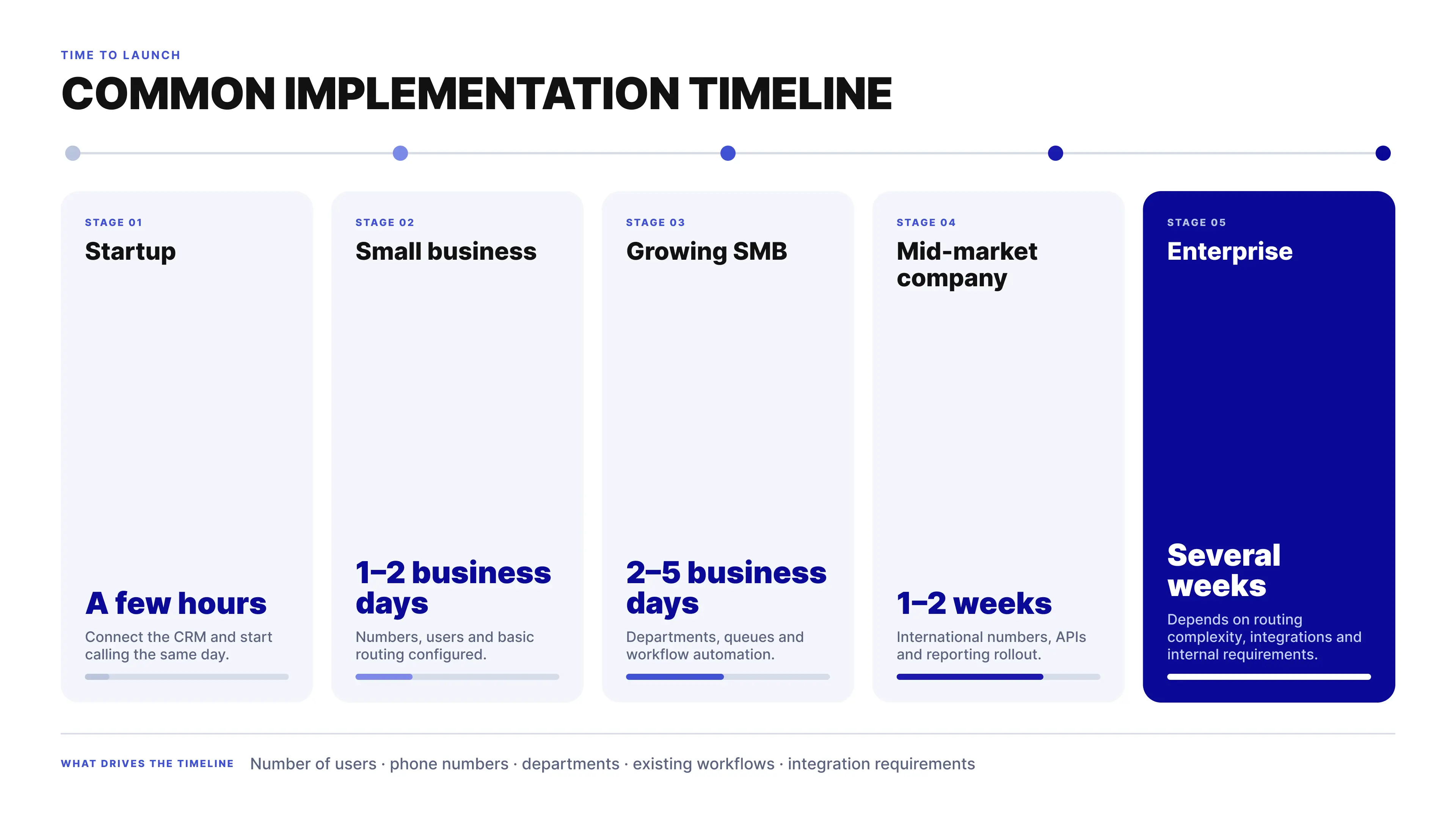
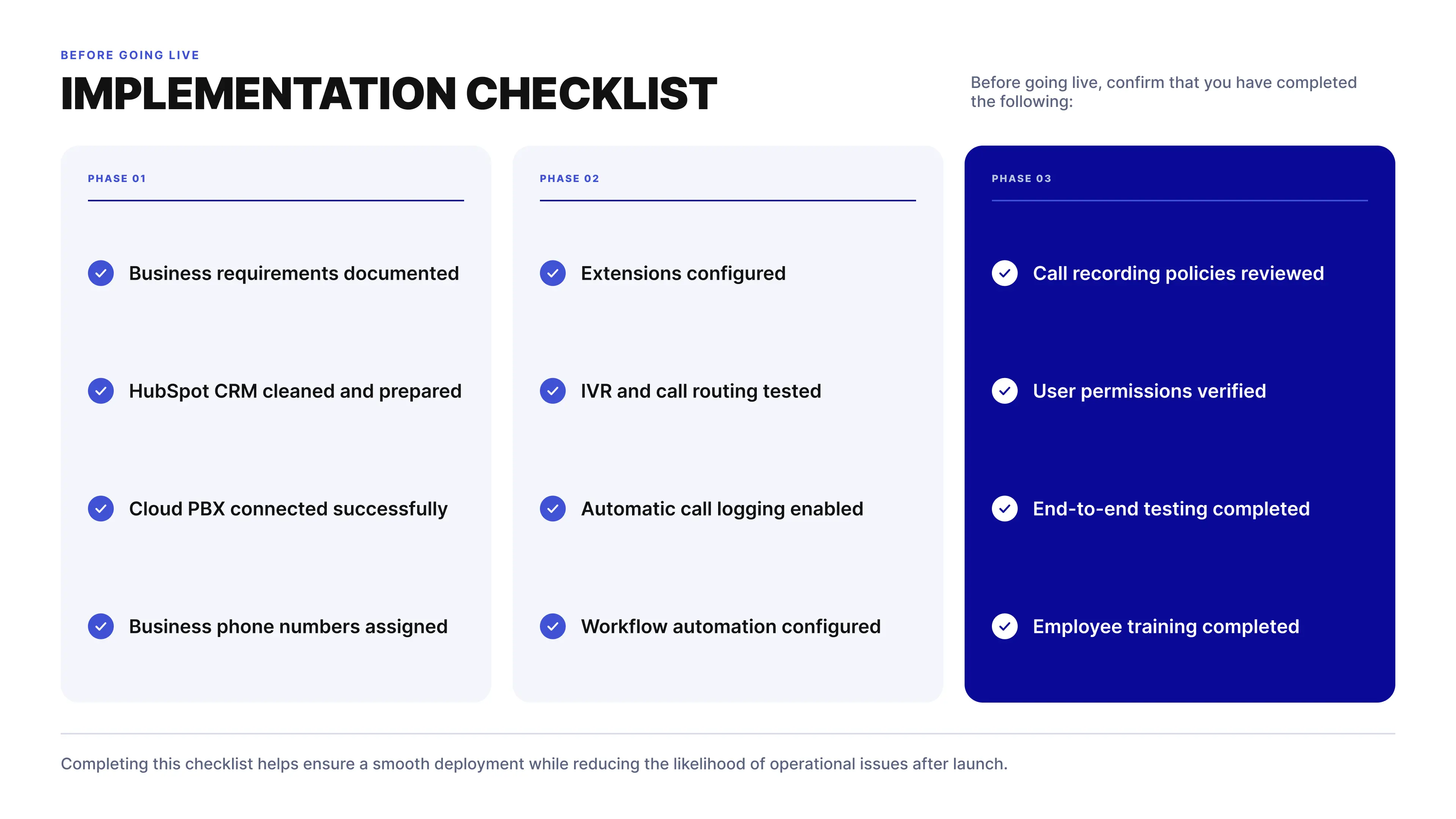
Troubleshooting Common HubSpot Phone Integration Issues
Even a well-designed HubSpot phone integration may occasionally require troubleshooting. Most issues are not caused by HubSpot itself but by configuration settings, user permissions, browser restrictions, CRM data quality, or synchronization between the cloud PBX and HubSpot.
The following troubleshooting guide covers the most common integration issues, their likely causes, and practical steps to resolve them.
Troubleshooting Common HubSpot Phone Integration Issues
Even a correctly configured HubSpot phone integration can occasionally run into problems. Changes to user permissions, browser settings, CRM synchronization, network configuration, or workflow rules can affect how telephony and HubSpot work together.
The following are some of the most common issues, their likely causes, and the first steps to check before contacting your provider.
Calls Are Not Logged in HubSpot
Completed calls do not appear in the relevant contact timeline, company record, deal, or ticket.
Possible causes
-
Call logging is disabled.
-
The integration has lost authorization.
-
The user is not connected to the integration.
-
CRM synchronization has failed.
-
Required permissions are missing.
How to resolve it
-
Verify that automatic call logging is enabled.
-
Confirm that the HubSpot integration is still authorized.
-
Check that the correct HubSpot user is connected.
-
Review synchronization settings.
-
Reauthorize the integration if necessary.
Caller Identification Does Not Work
An incoming call shows only the phone number instead of matching it with the customer's information in HubSpot.
Possible causes
-
The phone number does not exist in HubSpot.
-
Phone numbers are stored in inconsistent formats.
-
Duplicate contacts exist.
-
Synchronization has not completed.
How to resolve it
-
Store phone numbers in international E.164 format.
-
Merge duplicate contacts.
-
Verify contact synchronization.
-
Confirm that caller identification is enabled.
Click-to-Call Is Not Working
Clicking a phone number inside HubSpot does not start a call.
Possible causes
-
Browser calling is disabled.
-
The softphone is not connected.
-
Browser permissions are blocked.
-
User authentication has expired.
How to resolve it
-
Verify that browser calling is enabled.
-
Check browser microphone permissions.
-
Confirm that the user is signed in.
-
Refresh the browser session.
-
Restart the softphone if required.
Contacts Are Not Synchronizing
Symptoms
New contacts created in HubSpot do not appear in the phone system, or supported changes made in one platform are not reflected in the other.
Possible causes
-
Synchronization is disabled.
-
API authentication has expired.
-
User permissions are insufficient.
-
Synchronization rules are configured incorrectly.
How to resolve it
-
Verify synchronization settings.
-
Reconnect the integration.
-
Confirm API authorization.
-
Check user permissions.
-
Review synchronization logs if available.
Duplicate Contacts Appear
Multiple CRM records are created for the same customer.
Possible causes
-
Different phone number formats.
-
Manual contact creation.
-
Imported CRM data.
-
Synchronization conflicts.
How to resolve it
-
Standardize phone number formats.
-
Merge duplicate contacts.
-
Review CRM import procedures.
-
Configure duplicate detection rules.
Call Recordings Are Missing
Calls are completed successfully, but their recordings are not available in HubSpot.
Possible causes
-
Call recording is disabled.
-
Recording permissions are restricted.
-
Storage policies prevent synchronization.
-
Required recording or compliance settings have not been configured.
How to resolve it
-
Verify call recording settings.
-
Confirm that recording storage is available.
-
Check user permissions for recordings.
-
Review applicable regional compliance requirements and company recording policies.
Workflows Are Not Triggered
Symptoms
The call is logged successfully in HubSpot, but the expected workflow does not start.
Possible causes
-
The workflow uses the wrong trigger.
-
Call activity is not included in the trigger conditions.
-
Enrollment conditions are too restrictive.
-
The workflow is disabled.
How to resolve it
-
Review workflow triggers.
-
Verify enrollment conditions.
-
Test the workflow with a new call.
-
Confirm that the workflow is active.
Browser Calling Does Not Connect
Symptoms
The calling interface opens, but there is no audio or the call does not connect correctly.
Possible causes
-
Browser permissions.
-
Firewall restrictions.
-
Network configuration.
-
Incorrect audio device selection.
-
WebRTC settings.
How to resolve it
-
Allow microphone access in the browser.
-
Verify the selected speakers, microphone, and headset.
-
Check firewall rules.
-
Test the call in another supported browser.
-
Restart the browser session.
Because browser calling relies on WebRTC, both browser permissions and network configuration should be checked when the interface works but audio does not.
Users Cannot Access the Integration
Symptoms
An employee cannot make or receive calls through the HubSpot integration.
Possible causes
-
Missing licenses.
-
Incorrect user permissions.
-
Authentication errors.
-
Extension assignment issues.
How to resolve it
-
Verify user permissions.
-
Confirm that the correct extension is assigned.
-
Check that the required license is active.
-
Reauthenticate the affected account.
If the problem affects only one employee while other users can call normally, checking the individual user's permissions, authentication, and extension configuration is a good place to start.
Poor Call Quality
Symptoms
Calls experience delays, echo, dropped audio, or poor voice quality.
Possible causes
-
Unstable internet connection.
-
High network latency.
-
Packet loss.
-
VPN configuration.
-
Insufficient bandwidth.
How to resolve it
-
Test internet and network performance.
-
Use a wired connection when possible.
-
Prioritize VoIP traffic through QoS where appropriate.
-
Minimize competing network traffic.
-
Verify firewall and network configuration.
Poor call quality is not always caused by the HubSpot integration itself. Because voice traffic still depends on the underlying network, connection quality and network configuration should be checked as part of the troubleshooting process.
Best Practices for Troubleshooting
Many integration issues are easier to prevent than to diagnose after they begin affecting users.
Organizations should regularly:
-
Review integration status.
-
Monitor synchronization logs where available.
-
Keep HubSpot customer data clean.
-
Test browser calling after software or browser updates.
-
Review user permissions periodically.
-
Verify workflow automation after configuration changes.
-
Test inbound and outbound calling after major updates.
It is also useful to test the complete workflow, not only whether a call connects. For example, confirm that the caller is identified correctly, the relevant HubSpot record appears, the call is logged, the recording is available when configured, and the expected workflow runs afterward.
This helps identify problems between the phone system and CRM before they affect daily sales or support processes.
When to Contact Your Provider
If the issue continues after the basic troubleshooting steps above, contact your cloud PBX provider or HubSpot integration administrator.
Before opening a support request, collect:
-
Date and time of the issue.
-
Affected user.
-
Phone number involved.
-
Call direction: inbound or outbound.
-
Browser or application used.
-
Error messages or screenshots.
-
Steps already performed.
For call-specific problems, providing an exact example is particularly useful. Instead of reporting that “calls sometimes aren't logged,” include the affected phone number, user, call direction, and approximate timestamp.
This gives the technical team a specific event to investigate and can significantly reduce the time needed to identify whether the problem is related to HubSpot synchronization, authentication, telephony configuration, the browser, or the network.
Security and Compliance Considerations
Connecting HubSpot with a cloud PBX means customer information and communication data move between two systems. This can include contact details, call activity, recordings, user information, and other CRM data.
For that reason, security should be evaluated across the entire communication workflow—not only at login. Organizations should understand how data is authenticated, transmitted, stored, accessed, retained, and eventually deleted.
Secure Authentication
The connection between HubSpot and a cloud PBX starts with authentication.
Modern integrations typically use secure authorization methods that allow systems to exchange data without requiring employees to share their passwords between applications.
When evaluating a provider, check for:
-
Secure account authentication
-
Encrypted authorization tokens
-
Token renewal mechanisms
-
User-level access controls
-
Session management
Access should also be removed when it is no longer required, particularly when employees leave the organization or integrations are discontinued.
Encryption of Voice and Data
Communication data should be protected both in transit and at rest, where applicable.
Depending on the platform and configuration, this may include:
-
Voice traffic
-
API communications
-
Customer records
-
Call recordings
-
Authentication tokens
Ask providers which encryption methods and protocols they use, what information is encrypted, and where different types of data are stored. Simply stating that a platform “uses encryption” does not explain how each part of the communication workflow is protected.
Role-Based Access Control (RBAC)
Not every employee needs access to every customer record, call recording, report, or administrative setting.
Role-Based Access Control (RBAC) allows organizations to assign permissions according to job responsibilities.
For example:
-
Sales representatives access the customer information required for their accounts.
-
Customer Support Agents access support-related information.
-
Managers review relevant team reports and recordings.
-
Administrators manage users and system configuration.
-
Developers access required APIs without unnecessary CRM privileges.
The practical rule is simple: users should receive the access they need to do their jobs, rather than broad access to the entire communication environment.
Protecting Call Recordings
Call recordings require particular attention because they may contain personal, confidential, or commercially sensitive information.
Before enabling recording, define:
-
Which calls should be recorded.
-
Who can access recordings.
-
Where recordings are stored.
-
How long recordings are retained.
-
When and how recordings are deleted.
-
Whether callers need to be informed or provide consent.
These rules should be reflected in both the technical configuration and the organization's internal policies.
Legal requirements for recording calls differ between jurisdictions, so businesses should confirm applicable requirements with their legal or compliance teams.
API Security
HubSpot phone integrations use APIs to exchange information between the CRM and communication platform.
API access therefore needs the same attention as user access.
Recommended practices include:
-
Protect API credentials and tokens.
-
Rotate credentials where appropriate and supported.
-
Restrict API access to authorized applications.
-
Grant only the permissions required by the integration.
-
Monitor API activity where supported.
-
Remove unused integrations and credentials.
If a third-party application no longer needs access to HubSpot or the communication platform, that access should be revoked rather than left active indefinitely.
User Permissions and Account Management
Permissions can become difficult to manage as teams grow, employees change roles, and new administrators are added.
Regular access reviews help prevent old or unnecessary permissions from accumulating.
Administrators should:
-
Remove inactive users.
-
Disable former employee accounts promptly.
-
Review administrator privileges.
-
Audit permission changes where supported.
-
Assign access according to current responsibilities.
-
Review access to call recordings and sensitive customer information.
The same approach should apply to both HubSpot and the connected phone system.
Data Privacy and Regulatory Compliance
Organizations operating across different countries need to understand which privacy and communication requirements apply to their particular use case.
Depending on the jurisdiction and type of communication, this may include requirements related to:
-
Personal data processing
-
Call recording
-
Customer notification and consent
-
Data retention
-
Data deletion
-
Cross-border data transfers
-
Access to personal information
It is also important to understand where communication data is stored and how long it remains there. Call recordings, call metadata, CRM records, and system logs may have different storage locations and retention periods.
Because these requirements vary by jurisdiction and business activity, technical configuration should be reviewed together with the organization's legal or compliance requirements.
Business Continuity
Security is only one part of running reliable business communications. Organizations also need to consider what happens when infrastructure or individual services become unavailable.
When evaluating a cloud PBX provider, review:
-
Service availability commitments
-
Infrastructure redundancy
-
Disaster recovery processes
-
Backup procedures
-
Geographic redundancy
-
Platform monitoring
Also clarify who is responsible for restoring services, how incidents are escalated, and how quickly critical communication problems are handled.
Security Best Practices
A few practical controls can significantly strengthen a HubSpot phone integration:
-
Enable multi-factor authentication (MFA) wherever available.
-
Use strong, unique passwords for administrator accounts.
-
Limit administrative access.
-
Review user permissions regularly.
-
Remove inactive accounts and integrations.
-
Monitor API access and connected applications.
-
Train employees to recognize phishing and social engineering attempts.
-
Review call recording and retention policies periodically.
-
Test backup and recovery procedures.
-
Recheck security settings after significant configuration changes.
Security should be treated as an ongoing operational process rather than something completed during initial deployment.
Evaluating a Secure HubSpot Phone Integration
Before choosing a provider, ask specific questions about how security works in practice:
-
How is customer data protected during transmission and storage?
-
Which encryption methods and protocols are used?
-
Where are call recordings stored?
-
Who can access or delete recordings?
-
What retention controls are available?
-
Does the platform support role-based permissions?
-
How are API credentials and tokens protected?
-
Which authentication methods are supported?
-
Are administrative and user activities logged?
-
How are backups and disaster recovery handled?
-
Where is customer data physically stored?
-
How are cross-border data transfers handled where applicable?
A secure HubSpot phone integration is not defined by a single feature such as encryption or MFA. It depends on how authentication, permissions, encryption, recordings, APIs, data retention, and business continuity work together throughout the communication lifecycle.
How Teliqon Approaches Security
Teliqon is designed with business communications in mind, providing secure integration with HubSpot while allowing organizations to manage customer interactions from a centralized cloud PBX platform.
The platform supports secure authentication, role-based access management, protected API communication, centralized administration, and controlled access to communication data. Organizations can configure permissions, manage user access, and maintain consistent communication workflows while continuing to use HubSpot as their primary CRM.
As with any business communication platform, organizations should implement internal security policies, train employees, and periodically review their configuration to ensure that the environment remains aligned with operational and regulatory requirements.
Business Impact and ROI of HubSpot Phone Integration
Investing in a HubSpot phone integration is not simply about adding another communication tool. For most organizations, the primary objective is to improve operational efficiency, enhance customer experience, and reduce the amount of time employees spend on administrative work.
While the exact return on investment (ROI) depends on company size, communication volume, and internal processes, businesses typically experience measurable improvements in productivity, collaboration, and CRM data quality after integrating a cloud PBX with HubSpot.
Where Businesses Save Time
Without an integrated phone system, employees often perform the same administrative tasks after every customer conversation.
Typical manual activities include:
-
Searching for customer records.
-
Logging phone calls.
-
Writing call summaries.
-
Updating deals or tickets.
-
Creating follow-up tasks.
-
Scheduling callbacks.
Although each activity may take less than a minute, these repetitive tasks accumulate throughout the day.
By automating these processes, organizations allow employees to spend more time engaging with customers instead of maintaining CRM records.
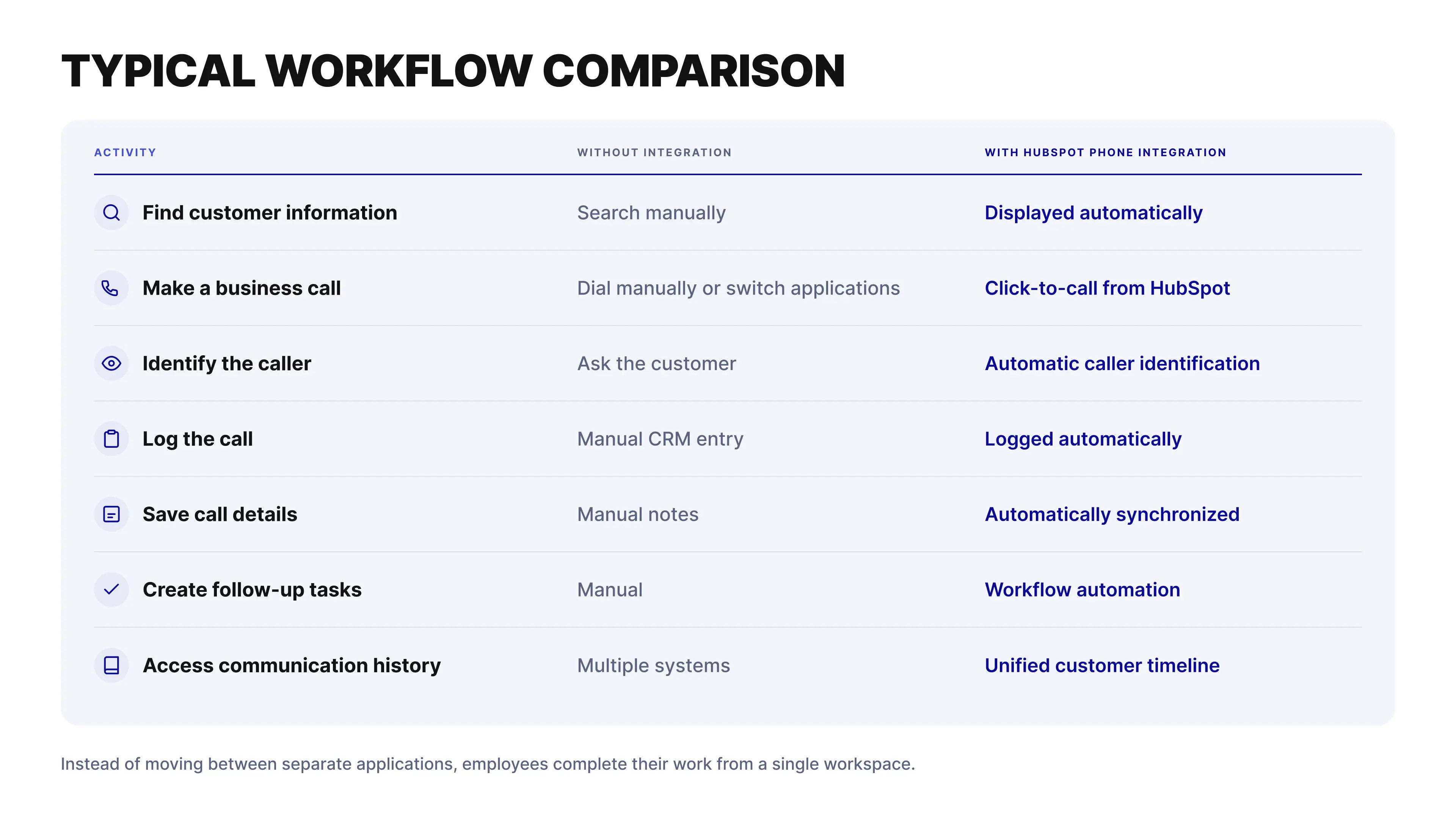
Productivity Improvements
The greatest productivity gains usually come from eliminating repetitive administrative work rather than reducing call duration.
Sales representatives can spend more time speaking with prospects.
Customer support agents can resolve issues faster because customer information is immediately available.
Managers receive accurate reporting without asking employees to update CRM records manually.
Even small time savings per conversation become significant across hundreds or thousands of monthly customer interactions.
Better Customer Experience
Customers expect organizations to remember previous conversations.
A HubSpot phone integration helps employees answer calls with complete customer context, reducing the need to repeat information or transfer customers between departments unnecessarily.
Typical customer experience improvements include:
-
Faster response times.
-
More personalized conversations.
-
Better first-contact resolution.
-
Consistent communication across departments.
-
Reduced waiting times through intelligent routing.
These improvements strengthen customer relationships while helping organizations deliver a more professional communication experience.
Higher CRM Data Quality
A CRM provides value only when its data is accurate.
Automatic synchronization helps ensure that communication records remain complete and consistent by reducing reliance on manual data entry.
Organizations benefit from:
-
More complete customer timelines.
-
Fewer missing activities.
-
Reduced duplicate information.
-
Better reporting accuracy.
-
More reliable sales forecasting.
Improved CRM quality also supports better decision-making across sales, support, and management teams.
Stronger Team Collaboration
Customer communication rarely involves only one department.
Sales, customer support, customer success, finance, and account management often interact with the same customer throughout the relationship.
When communication history is centralized inside HubSpot, authorized employees can access the same customer context without requesting information from colleagues or searching across multiple systems.
This reduces internal delays while improving collaboration across the organization.
Long-Term Operational Benefits
As organizations grow, communication processes become increasingly complex.
A cloud PBX integrated with HubSpot provides a foundation that supports:
-
Business expansion.
-
Remote and hybrid work.
-
Additional departments.
-
International operations.
-
Higher communication volumes.
-
Future workflow automation.
Instead of redesigning communication processes as the business grows, organizations can scale existing workflows while maintaining consistency across teams.
How to Evaluate ROI
Every organization measures success differently, but the following indicators are commonly used to evaluate the effectiveness of a HubSpot phone integration:
Operational Efficiency
-
Reduction in manual CRM updates.
-
Time saved after customer conversations.
-
Faster call handling.
-
Increased employee productivity.
Customer Experience
-
Faster response times.
-
Improved first-contact resolution.
-
More consistent communication.
-
Better customer satisfaction.
Sales Performance
-
Faster lead response.
-
More completed follow-up activities.
-
Improved pipeline visibility.
-
Better forecasting.
Management
-
More accurate reporting.
-
Improved visibility into team performance.
-
Better workload planning.
-
Data-driven decision-making.
Tracking these indicators over time provides a more meaningful measure of ROI than evaluating software costs alone.
Looking Beyond Software Costs
Organizations sometimes compare communication platforms based only on monthly subscription fees.
However, software cost represents only one part of the overall investment.
The broader business impact often includes:
-
Reduced administrative workload.
-
Higher employee productivity.
-
Better collaboration.
-
Improved reporting accuracy.
-
More scalable communication processes.
-
Better customer experience.
When these operational improvements are considered alongside subscription costs, businesses gain a more complete understanding of the long-term value of a HubSpot phone integration.
HubSpot Phone Integration Checklist
Choosing and implementing a HubSpot phone integration involves more than comparing feature lists. A successful deployment depends on selecting a solution that aligns with your communication strategy, business processes, security requirements, and long-term growth plans.
Use the following checklist to evaluate your readiness before selecting a provider and again before deploying your integration.
Business Requirements
Before evaluating providers, confirm that your organization has clearly defined its communication requirements.
✓ Identify the teams that will use the phone system.
✓ Estimate the number of users and business extensions required.
✓ Define expected daily inbound and outbound call volumes.
✓ Determine whether remote or hybrid employees need access.
✓ Identify countries where business phone numbers are required.
✓ Decide which customer interactions should trigger automated workflows.
✓ Define reporting and analytics requirements.
A clear understanding of your communication needs helps ensure that the selected solution supports both current operations and future growth.
Provider Evaluation
Compare providers using consistent evaluation criteria rather than focusing on price alone.
Confirm that the provider offers:
✓ Native HubSpot integration.
✓ Browser-based calling.
✓ Mobile applications.
✓ Automatic call logging.
✓ Caller identification.
✓ Screen Pop.
✓ Contact synchronization.
✓ Call recording.
✓ Workflow automation.
✓ APIs and webhooks.
✓ Business phone numbers.
✓ IVR and Auto Attendant.
✓ Ring Groups.
✓ Call Queues.
✓ Business Hours Routing.
✓ Reporting and analytics.
✓ Scalability for future business growth.
The more communication capabilities available within a single platform, the easier it becomes to maintain efficient workflows as your organization expands.
CRM Preparation
Before connecting your phone system to HubSpot, review the quality of your CRM data.
✓ Remove duplicate contacts.
✓ Standardize phone numbers using international (E.164) format.
✓ Verify contact ownership.
✓ Review lifecycle stages and pipelines.
✓ Archive obsolete records.
✓ Confirm user permissions.
Accurate CRM data improves caller identification, synchronization, reporting, and automation.
Deployment Checklist
Before making the integration available to all users, verify that the communication environment has been configured correctly.
✓ Business phone numbers assigned.
✓ User extensions created.
✓ Caller ID configured.
✓ IVR menus tested.
✓ Auto Attendant configured.
✓ Ring Groups operational.
✓ Call Queues tested.
✓ Business Hours Routing configured.
✓ Browser calling enabled.
✓ Mobile calling tested.
✓ Contact synchronization verified.
✓ Automatic call logging enabled.
✓ Workflow automation configured.
✓ Call recording reviewed.
✓ Reports generating correctly.
Testing every major workflow before launch reduces the likelihood of operational issues after deployment.
Security Checklist
Review the security configuration before employees begin using the integration.
✓ Multi-factor authentication enabled where available.
✓ Administrator accounts secured.
✓ Role-based permissions reviewed.
✓ API credentials protected.
✓ Call recording access restricted.
✓ User access verified.
✓ Backup procedures reviewed.
✓ Internal security policies documented.
Protecting customer information should be part of every implementation project.
Employee Readiness
Technology adoption is just as important as technical implementation.
Before launch:
✓ Train employees on browser calling.
✓ Demonstrate click-to-call workflows.
✓ Explain caller identification and Screen Pop.
✓ Review automatic call logging.
✓ Introduce workflow automation.
✓ Train managers to use reporting dashboards.
✓ Encourage employees to work directly from HubSpot.
Well-trained teams achieve faster adoption and greater business value from the integration.
Ongoing Optimization
Successful organizations continue improving their communication workflows after deployment.
Schedule regular reviews to:
✓ Monitor communication analytics.
✓ Review routing performance.
✓ Identify manual processes that can be automated.
✓ Remove inactive users.
✓ Audit permissions.
✓ Review workflow performance.
✓ Optimize customer journeys.
✓ Update communication policies as business requirements evolve.
Continuous optimization helps maintain high operational efficiency while supporting business growth.
Success Indicators
After implementation, monitor measurable outcomes rather than focusing only on system usage.
Key indicators include:
✓ Reduced manual CRM updates.
✓ Faster customer response times.
✓ More complete communication history.
✓ Improved reporting accuracy.
✓ Increased employee productivity.
✓ Better collaboration across teams.
✓ Higher customer satisfaction.
✓ More efficient communication workflows.
Tracking these indicators helps determine whether the integration is delivering meaningful business value.
Final Review
Before considering your implementation complete, confirm the following:
✓ Your communication workflows are clearly defined.
✓ The cloud PBX integrates successfully with HubSpot.
✓ Customer data is synchronized accurately.
✓ Employees understand how to use the system.
✓ Security controls are in place.
✓ Automation is functioning correctly.
✓ Reporting provides meaningful business insights.
✓ The platform can scale alongside future business growth.
Completing this checklist helps create a reliable, secure, and scalable communication environment that supports sales, customer support, customer success, and long-term
10 Common Myths About HubSpot Phone Integration
There are still many misconceptions about what HubSpot phone integration can do and when a business actually needs it. Here are ten of the most common ones.
Myth 1. HubSpot Is a Business Phone System
Reality
HubSpot is a customer relationship management (CRM) platform, not a cloud PBX.
HubSpot includes native calling capabilities, but businesses that need more advanced telephony can connect it with a cloud PBX. This adds features such as IVR, Call Queues, Ring Groups, browser calling, business phone numbers, and intelligent call routing.
The roles are different: HubSpot manages customer relationships and CRM processes, while the cloud PBX manages business communications.
Myth 2. Phone Integration Is Only for Large Enterprises
Reality
Company size isn't the main factor. What matters is how your team communicates with customers.
A small sales team can save time with automatic call logging and click-to-call. A larger sales or support department may need workflow automation, advanced routing, reporting, and centralized communication management.
The right setup depends on call volume and business processes rather than the number of employees.
Myth 3. Employees Need to Learn a Completely New System
Reality
A HubSpot phone integration can fit into the CRM workflow employees already use.
Features such as caller identification, click-to-call, automatic call logging, and workflow automation reduce the need to move between separate systems or enter the same information twice.
For employees, the biggest change is often simple: fewer manual tasks around each customer call.
Myth 4. Phone Integration Is Difficult to Deploy
Reality
The complexity depends on the telephony environment and the workflows you want to build.
A standard implementation may involve connecting HubSpot with the cloud PBX, configuring business phone numbers, setting up call routing, enabling synchronization, and testing inbound and outbound call flows.
More complex environments with multiple teams, numbers, routing rules, or custom workflows require additional planning. However, a standard cloud deployment can often be completed in hours or days rather than months.
Myth 5. Automatic Call Logging Eliminates the Need for CRM Management
Reality
Automatic synchronization reduces manual data entry, but it doesn't remove the need to manage your CRM.
Teams still need to review duplicate contacts, keep customer information up to date, manage pipelines, and check whether workflows are working as intended.
Automation makes CRM management easier. It doesn't replace it.
Myth 6. Browser Calling Is Less Reliable Than Desk Phones
Reality
Modern browser calling uses WebRTC technology, allowing voice communication directly through a compatible web browser without a traditional desk phone.
Reliability still depends on factors such as internet connection quality, network configuration, available bandwidth, and compatible hardware.
With the right environment, browser calling can provide a reliable option for office, remote, and hybrid teams while reducing dependence on physical phones.
Myth 7. Every HubSpot Phone Integration Provides the Same Features
Reality
This is where providers can differ significantly.
Some integrations focus mainly on click-to-call. Others connect HubSpot with a broader cloud communications platform that can provide intelligent routing, call recording, workflow automation, analytics, APIs, business phone numbers, and more advanced CRM synchronization.
Before choosing a provider, check what information is actually synchronized with HubSpot, which calling features are supported, and whether the solution can scale with your communication requirements.
Myth 8. Phone Integration Is Only About Making Calls
Reality
Calling is only one part of the integration.
Depending on the provider and configuration, a cloud PBX can support:
-
Automatic call logging.
-
Caller identification.
-
Screen Pop.
-
Contact synchronization.
-
Workflow automation.
-
Call recording.
-
Analytics.
-
Business phone numbers.
-
Browser and mobile calling.
The goal isn't simply to add another way to make calls. It is to connect voice communication with the customer data and workflows your team already manages in HubSpot.
Myth 9. You Need to Replace Your Existing CRM
Reality
A cloud PBX extends HubSpot rather than replacing it.
HubSpot continues to manage customer relationships, pipelines, marketing activities, and service processes. The cloud PBX provides the telephony infrastructure for voice communication.
Connecting the two gives teams a more unified customer communication platform while allowing HubSpot to remain the central CRM.
Myth 10. Lower Subscription Cost Always Means Better Value
Reality
A lower monthly price doesn't necessarily mean a lower total cost for the business.
When comparing HubSpot phone integration providers, consider how much manual work the solution removes, how well it fits existing workflows, what reporting it provides, how easily it can scale, and how much administration it requires.
A solution that automatically records call activity, connects conversations with customer records, and reduces routine work may provide more value than a cheaper option that requires employees to complete these tasks manually.
Ultimately, the right choice depends on the complete business impact: productivity, CRM accuracy, customer experience, scalability, and long-term operational efficiency.
Key Takeaway
Many misconceptions about HubSpot phone integration come from treating HubSpot and business telephony as the same thing or comparing individual features without looking at the complete communication process.
HubSpot manages customer data, sales activities, and support interactions, while a cloud PBX manages business calls and telephony workflows. When the two systems are connected, businesses can bring customer information and phone activity into the same workflow.
Understanding these different roles makes it easier to choose the right provider, evaluate the features your team actually needs, and build a communication setup that can support the business as it grows.
About this Guide
This guide was prepared using official HubSpot developer documentation, Teliqon product documentation, internationally recognized communication standards (SIP, WebRTC, OAuth 2.0), and industry best practices for CRM and cloud communications. It is intended as an educational resource for organizations evaluating HubSpot phone integrations and cloud PBX solutions.
References
-
Teliqon Developers Documentation – API reference, webhooks, authentication, events, and integration documentation.
https://developers.teliqon.io/ -
Teliqon HubSpot CRM Integration – Official overview of Teliqon's HubSpot integration features and capabilities.
https://teliqon.io/resources/integrations/hubspot-crm-integration -
HubSpot Calling Extensions SDK – Official documentation for building and integrating third-party calling providers with HubSpot CRM.
HubSpot Calling Extensions SDK -
HubSpot – Receive Incoming Calls API – Official documentation for inbound calling, caller identification, and call synchronization within HubSpot.
HubSpot Receive Incoming Calls API -
HubSpot – Third-Party Calling Integration – Official guide for integrating external VoIP and Cloud PBX providers with HubSpot.
HubSpot Third-Party Calling Documentation -
HubSpot Calls API – Official CRM Calls API documentation for creating, managing, and synchronizing call engagements.
https://developers.hubspot.com/docs/api-reference/crm-calls-v3/guide -
HubSpot Academy – Official learning resources covering CRM, sales, automation, customer service, and HubSpot best practices.
https://academy.hubspot.com/ -
MDN Web Docs – WebRTC API – Reference documentation for browser-based real-time voice and video communications (WebRTC).
https://developer.mozilla.org/docs/Web/API/WebRTC_API -
IETF RFC 3261 – SIP: Session Initiation Protocol – The official specification for the Session Initiation Protocol (SIP), the foundation of modern VoIP communications.
https://datatracker.ietf.org/doc/html/rfc3261 -
OAuth 2.0 Authorization Framework (RFC 6749) – Official specification describing secure authorization used by modern SaaS integrations.
https://datatracker.ietf.org/doc/html/rfc6749 -
European Commission – General Data Protection Regulation (GDPR) – Official information about the European Union's data protection and privacy framework.
https://commission.europa.eu/law/law-topic/data-protection/data-protection-eu_en -
W3C – Web Real-Time Communications (WebRTC) – Official W3C specification for real-time browser communications.
https://www.w3.org/TR/webrtc/ -
HubSpot Knowledge Base – Calling Integrations – Official documentation for configuring and using third-party calling providers inside HubSpot.
HubSpot Knowledge Base – Calling Integrations
Arthur Kyselevskyi

Follow Us in social networks


The latest from Teliqon
Stay ahead with insights from the leader in trusted communications. Subscribe for the latest blogs, updates, and exclusive content.